
How to replace pandas values by NaN by threshold
When processing pandas datasets, often you need to remove values above or below a given threshold from a dataset. One way to “remove” values from a dataset is to replace them by NaN (not a number) values which are typically treated as “missing” values.
For example: In order to replace values of the xcolumn by NaNwhere the x column is< 0.75 in a DataFrame df, use this snippet:
import numpy as np

df["x"][df["x"] < -0.75] = np.nanFor example, we can run this on the TechOverflow pandas time series example dataset. The original dataset has two columns: Sine and Cosine and looks like this:
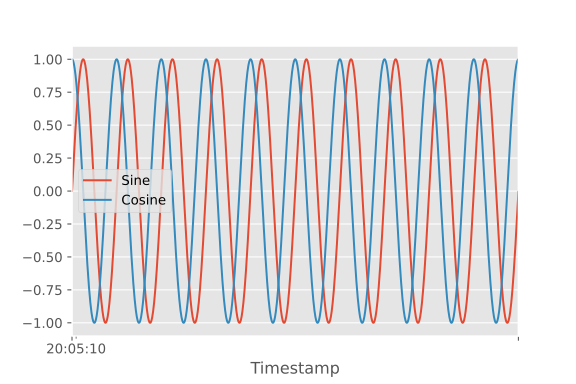
After running
df["Sine"][df["Sine"] < -0.75] = np.nanyou can see that all Sine values below 0.75 have been omitted from the plot, but all the values from the Cosine column are left unchanged:
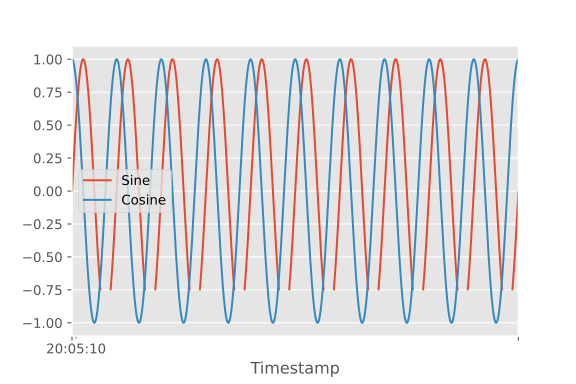
Complete example code:
import pandas as pd
import numpy as np
from matplotlib import pyplot as plt
plt.style.use("ggplot")

# Load pre-built time series example dataset
df = pd.read_csv("https://datasets.techoverflow.net/timeseries-example.csv", parse_dates=["Timestamp"])
df.set_index("Timestamp", inplace=True)

# Plot original code
df.plot()
plt.savefig("TimeSeries-Original.svg")and this is the code to plot the filtered dataset:
df[df < -0.75] = np.nan
df.plot()
plt.savefig("TimeSeries-NaN.svg")