
Plotting microstrip impedance vs width using UliEngineering
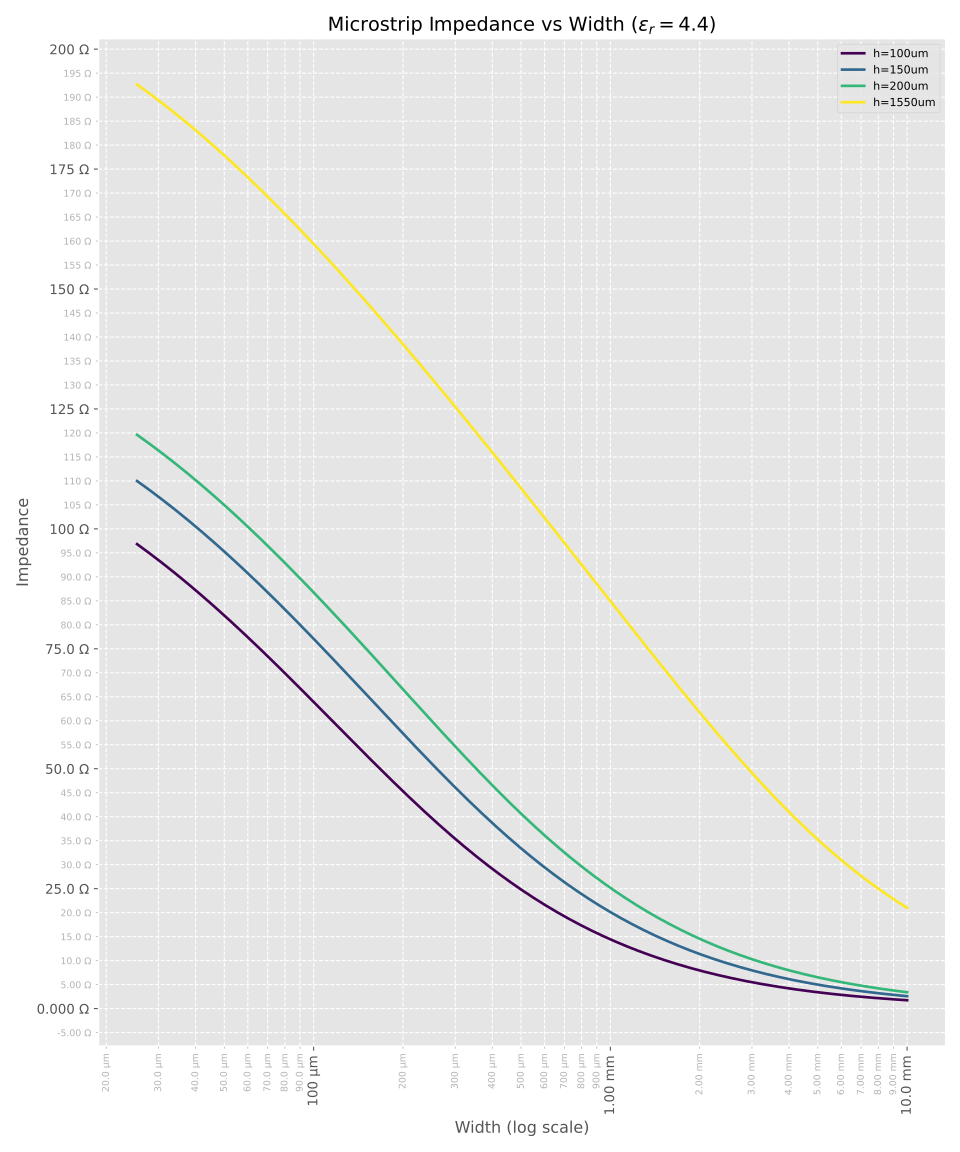
The following charts provide an easy way of visualizing the relationship between microstrip width and impedance for various substrate heights and thicknesses.
See Prepreg and core thickness for different standard stackups for more information on standard PCB stackup thicknesses and $\epsilon_r$ values.
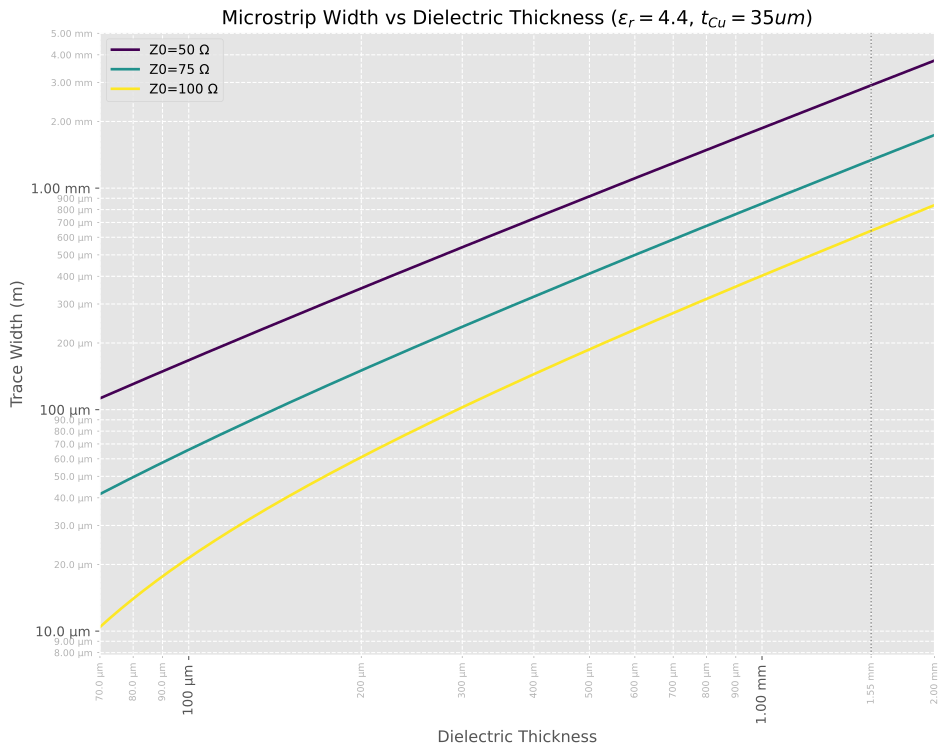
Another way to look at the same data is to plot dielectric thickness vs trace width for pre-set impedance values:
or in mil:

Basic example
This Python script shows how to calculate the microstrip impedance for a single set of parameters using the UliEngineering library.
#!/usr/bin/env python3
from UliEngineering.Electronics.Microstrip import microstrip_width
from UliEngineering.EngineerIO import format_value
from UliEngineering.EngineerIO.Length import convert_length_to_unit

# Compute the width for a 50 Ω microstrip using string args with units
w = microstrip_width("50 Ω", h="150 um", t="35 um", e_r="4.4")
# Convert result (meters) to mils and print
w_mil = convert_length_to_unit(w, "m", "mil")
print(format_value(w_mil, "mil"))Output of the example script
10.2 milPlot source code
This script is used to produce the impedance vs width plot shown above.
#!/usr/bin/env python3
# SPDX-License-Identifier: CC0-1.0
import numpy as np
import matplotlib.pyplot as plt
from matplotlib.ticker import FuncFormatter, AutoMinorLocator

# UliEngineering imports
from UliEngineering.Electronics.Microstrip import microstrip_impedance
from UliEngineering.EngineerIO import format_value
from UliEngineering.EngineerIO.Length import normalize_length

# Constants
e_r = 4.4
thicknesses = ["100um", "150um", "200um", "1550um"]
# Copper thickness (defaulting to 35um as it wasn't specified but is required for calculation)
t_copper = "35um"

# Width axis: 1mil to 10mm linear
w_min = normalize_length("1mil")
w_max = normalize_length("10mm")
# For a log x-axis we need widths spaced logarithmically; use np.logspace
widths = np.logspace(np.log10(w_min), np.log10(w_max), 1000)

# Plotting
plt.style.use("ggplot")
fig, ax = plt.subplots(figsize=(10, 12))

# Generate colors
colors = plt.cm.viridis(np.linspace(0, 1, len(thicknesses)))

for h_str, c in zip(thicknesses, colors):
    # Calculate impedance for each width
    # microstrip_impedance uses math functions so it doesn't support numpy arrays directly
    zs = [microstrip_impedance(w, h=h_str, t=t_copper, e_r=e_r) for w in widths]

    ax.plot(widths, zs, color=c, lw=2, label=f"h={h_str}")

# Add a legend
legend = ax.legend(loc='upper right', fontsize='small')

ax.set_xscale("log")
ax.set_xlabel("Width (log scale)")
ax.set_ylabel("Impedance")
ax.set_title(rf"Microstrip Impedance vs Width ($\epsilon_r={e_r}$)")
ax.grid(True, which="both", ls="--")

# Axis formatters using EngineerIO format_value
ax.xaxis.set_major_formatter(FuncFormatter(lambda x, pos: format_value(x, "m")))
ax.yaxis.set_major_formatter(FuncFormatter(lambda y, pos: format_value(y, "Ω")))

# Enable minor ticks and add minor tick labels on the Y axis
ax.minorticks_on()
# For linear scale, AutoMinorLocator is usually good, or we can let matplotlib handle it.
# The template used LogLocator, but we are linear.
ax.yaxis.set_minor_locator(AutoMinorLocator())
ax.yaxis.set_minor_formatter(FuncFormatter(lambda y, pos: format_value(y, "Ω")))

# Style minor tick labels: 30% smaller and 70% gray
maj_ylabels = ax.yaxis.get_ticklabels(which='major')
if len(maj_ylabels) > 0:
    base_size = maj_ylabels[0].get_size()
else:
    base_size = plt.rcParams.get('ytick.labelsize', plt.rcParams.get('font.size', 10))
ax.tick_params(axis='y', which='minor', labelsize=base_size * 0.7, labelcolor='0.7', colors='0.7')

# Also set x-axis minor ticks and style them with smaller rotated labels
from matplotlib.ticker import LogLocator
ax.xaxis.set_minor_locator(LogLocator(base=10.0, subs=(2, 3, 4, 5, 6, 7, 8, 9)))
ax.xaxis.set_minor_formatter(FuncFormatter(lambda x, pos: format_value(x, "m")))

maj_xlabels = ax.xaxis.get_ticklabels(which='major')
if len(maj_xlabels) > 0:
    base_x_size = maj_xlabels[0].get_size()
else:
    base_x_size = plt.rcParams.get('xtick.labelsize', plt.rcParams.get('font.size', 10))
ax.tick_params(axis='x', which='minor', labelsize=base_x_size * 0.7, labelcolor='0.7', colors='0.7')

for tl in ax.get_xminorticklabels():
    tl.set_rotation(90)
for tl in ax.get_xmajorticklabels():
    tl.set_rotation(90)

fig.tight_layout()
plt.show()
plt.savefig("Microstrip-Impedance.svg")On the other hand, the following script produces a plot of dielectric thickness vs for pre-set impedance values (the second and third plot seen above, with the third being generated using --y-unit mil).
#!/usr/bin/env python3
# SPDX-License-Identifier: CC0-1.0
import argparse
import numpy as np
import matplotlib.pyplot as plt
from matplotlib.ticker import FuncFormatter, LogLocator

# UliEngineering imports
from UliEngineering.Electronics.Microstrip import microstrip_width
from UliEngineering.EngineerIO import format_value
from UliEngineering.EngineerIO.Length import normalize_length, convert_length_to_unit

# Command line: choose Y axis units (meters by default, or "mil")
parser = argparse.ArgumentParser(description="Plot microstrip width vs dielectric thickness")
parser.add_argument("--y-unit", choices=("m", "mil"), default="m",
                    help="Units for the Y axis: 'm' for meters (default) or 'mil' for mils")
args = parser.parse_args()
y_unit = args.y_unit

# Constants
e_r = 4.4
impedances = [50, 75, 100]
# Copper thickness
t_copper = "35um"

# Thickness axis: 70um to 2.0mm (log sampling so values are nicely spaced on a log-x axis)
h_min = normalize_length("70um")
h_max = normalize_length("2mm")
thicknesses = np.logspace(np.log10(h_min), np.log10(h_max), num=1000)

# Plotting
plt.style.use("ggplot")
fig, ax = plt.subplots(figsize=(10, 8))

# Generate colors using viridis for nicer, perceptually-uniform colors
colors = plt.cm.viridis(np.linspace(0, 1, len(impedances)))

# Compute width traces and collect them for determining Y limits when needed
all_ws = []
for z0, c in zip(impedances, colors):
    ws = [microstrip_width(Z0=z0, h=h, t=t_copper, e_r=e_r) for h in thicknesses]
    ax.plot(thicknesses, ws, color=c, lw=2, label=f"Z0={z0} Ω")
    all_ws.append(np.array(ws))

# Add a legend
legend = ax.legend(loc='upper left', fontsize='medium')

ax.set_xlabel("Dielectric Thickness")
ax.set_ylabel(f"Trace Width ({'m' if y_unit == 'm' else 'mil'})")
ax.set_title(rf"Microstrip Width vs Dielectric Thickness ($\epsilon_r={e_r}$, $t_{{Cu}}={t_copper}$)")
ax.grid(True, which="both", ls="--")

# Log scaling on both axes
ax.set_xscale("log")
ax.set_yscale("log")

# Enforce X limits from 70 µm to 2.0 mm exactly
ax.set_xlim(h_min, h_max)

# Configure major and minor locators for log scales
major_x_locator = LogLocator(base=10.0)
minor_x_locator = LogLocator(base=10.0, subs=(2, 3, 4, 5, 6, 7, 8, 9))
major_y_locator = LogLocator(base=10.0)
minor_y_locator = LogLocator(base=10.0, subs=(2, 3, 4, 5, 6, 7, 8, 9))
ax.xaxis.set_major_locator(major_x_locator)
ax.xaxis.set_minor_locator(minor_x_locator)
ax.yaxis.set_major_locator(major_y_locator)
ax.yaxis.set_minor_locator(minor_y_locator)

# Axis formatters using EngineerIO format_value
ax.xaxis.set_major_formatter(FuncFormatter(lambda x, pos: format_value(x, "m")))

# Y axis formatter depends on the requested unit.
if y_unit == "m":
    ax.yaxis.set_major_formatter(FuncFormatter(lambda y, pos: format_value(y, "m")))
    ax.yaxis.set_minor_formatter(FuncFormatter(lambda y, pos: format_value(y, "m")))
else:
    # Format values in mils without SI prefixes using the helper
    def format_mil_no_prefix(y, pos):
        mils = convert_length_to_unit(y, "m", "mil")
        if mils >= 100:
            s = f"{int(round(mils))} mil"
        elif mils >= 10:
            s = f"{mils:.1f} mil"
        elif mils >= 1:
            s = f"{mils:.2f} mil"
        else:
            s = f"{mils:.3f} mil"
        return s

    ax.yaxis.set_major_formatter(FuncFormatter(format_mil_no_prefix))
    ax.yaxis.set_minor_formatter(FuncFormatter(format_mil_no_prefix))

# Enable minor ticks
ax.minorticks_on()
ax.xaxis.set_minor_formatter(FuncFormatter(lambda x, pos: format_value(x, "m")))

# Compute and set X ticks constrained to the requested X range
major_locs = major_x_locator.tick_values(h_min, h_max)
minor_locs = minor_x_locator.tick_values(h_min, h_max)
major_locs = np.array([m for m in major_locs if m >= h_min and m <= h_max])
minor_locs = np.array([m for m in minor_locs if m >= h_min and m <= h_max])

# Add special minor tick at X = 1.55 mm
special_tick = normalize_length("1.55mm")
if special_tick not in minor_locs:
    minor_locs = np.sort(np.concatenate((minor_locs, [special_tick])))

# Set ticks explicitly
ax.set_xticks(major_locs, minor=False)
ax.set_xticks(minor_locs, minor=True)

# Also draw a subtle vertical guide at 1.55 mm to emphasize the special point
ax.axvline(special_tick, color='0.5', linestyle=':', linewidth=1)

# compute Y range from data and set appropriate ticks if in mil mode
if len(all_ws) > 0:
    y_all = np.concatenate(all_ws)
    y_all = y_all[y_all > 0]
    if len(y_all) > 0:
        y_min = np.min(y_all)
        y_max = np.max(y_all)
        # padding
        y_pad = (np.log10(y_max) - np.log10(y_min)) * 0.05 if y_max > y_min else 0.1
        ax.set_ylim(10 ** (np.log10(y_min) - y_pad), 10 ** (np.log10(y_max) + y_pad))

        if y_unit == 'mil':
            yl, yu = ax.get_ylim()
            yl_mil = convert_length_to_unit(yl, 'm', 'mil')
            yu_mil = convert_length_to_unit(yu, 'm', 'mil')
            # choose major decades in mils (10, 100, 1000, ...)
            dmin = int(np.floor(np.log10(max(yl_mil, 1e-12))))
            dmax = int(np.ceil(np.log10(max(yu_mil, 1e-12))))
            # Ensure we include 1 mil (10^0) as a major tick when possible
            dstart = max(0, dmin)
            majors_mil = [10 ** d for d in range(dstart, dmax + 1)]
            majors_m = [convert_length_to_unit(m, 'mil', 'm') for m in majors_mil]
            minors_m = []
            for d in range(dstart, dmax + 1):
                for s in (2, 3, 4, 5, 6, 7, 8, 9):
                    v_mil = s * (10 ** d)
                    minors_m.append(convert_length_to_unit(v_mil, 'mil', 'm'))
            majors_m = np.array([m for m in majors_m if m >= yl and m <= yu])
            minors_m = np.array([m for m in minors_m if m >= yl and m <= yu])
            ax.set_yticks(majors_m, minor=False)
            ax.set_yticks(minors_m, minor=True)

# Rotate labels if needed
for tl in ax.get_xminorticklabels():
    tl.set_rotation(90)
for tl in ax.get_xmajorticklabels():
    tl.set_rotation(90)

# Style minor tick labels: 30% smaller and 70% gray (both axes)
maj_ylabels = ax.yaxis.get_ticklabels(which='major')
if len(maj_ylabels) > 0:
    base_y_size = maj_ylabels[0].get_size()
else:
    base_y_size = plt.rcParams.get('ytick.labelsize', plt.rcParams.get('font.size', 10))
maj_xlabels = ax.xaxis.get_ticklabels(which='major')
if len(maj_xlabels) > 0:
    base_x_size = maj_xlabels[0].get_size()
else:
    base_x_size = plt.rcParams.get('xtick.labelsize', plt.rcParams.get('font.size', 10))
ax.tick_params(axis='y', which='minor', labelsize=base_y_size * 0.7, labelcolor='0.7', colors='0.7')
ax.tick_params(axis='x', which='minor', labelsize=base_x_size * 0.7, labelcolor='0.7', colors='0.7')

fig.tight_layout()
plt.savefig("Microstrip-Width.svg", dpi=300, bbox_inches='tight')
# Only show interactively when not running in headless CI
try:
    plt.show()
except Exception:
    pass