
How to unwrap encoder values or angles which wrap at a certain numeric point
Working with wrapped quantities (angles, counters, modulo streams) is common in signal processing. This short post shows two simple, self-contained examples: the static unwrap() function and the stateful OnlineUnwrapper (for streaming/online use). Both expect 1D inputs and preserve the same number of samples.
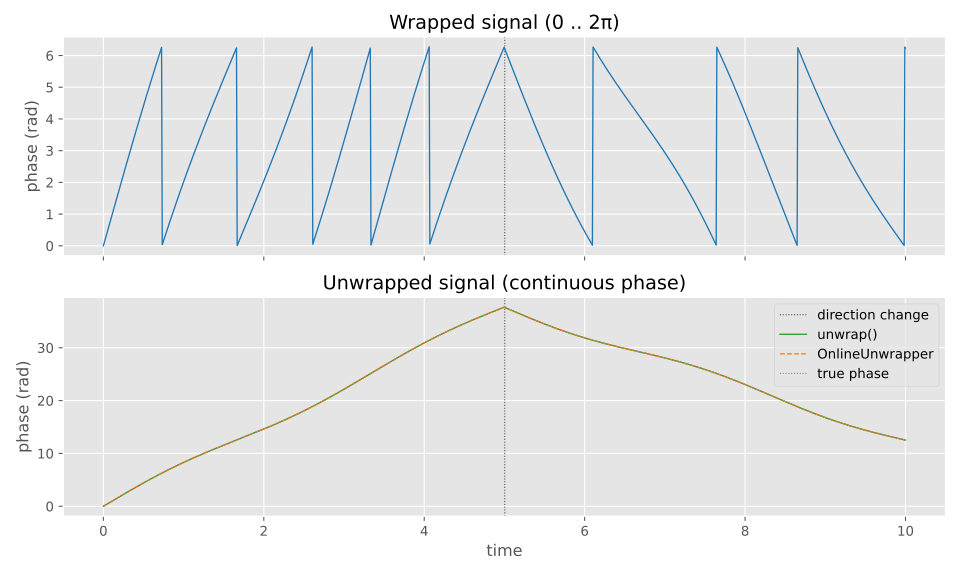
Using unwrap() — static (batch) unwrapping
Best when you have the entire series available. Tip: set threshold if your values or noise require a different wrap detection sensitivity.
unwrap_example.py
# Simple example (self-contained)
import numpy as np
from UliEngineering.SignalProcessing.WrappedValues import unwrap

# Angles in degrees, wrapped at 360
wrapped = np.array([350, 355,   1,   3])   # jump 355 -> 1 (wrap)
un = unwrap(wrapped, wrap_value=360)

print(un) # -> [350. 355. 361. 363.] (continuous increasing angle)Using OnlineUnwrapper — online/streaming unwrapping
Use when data arrives one sample at a time or in chunks. Maintains internal state.
Note: Both methods preserve sample counts and are 1D-only. Use unwrap() for batch processing and OnlineUnwrapper to process real-time streams or mixed scalar/chunk inputs.
online_unwrapper_example.py
# Online scalar and chunk usage
import numpy as np
from UliEngineering.SignalProcessing.WrappedValues import OnlineUnwrapper

u = OnlineUnwrapper(wrap_value=100)   # counters wrapping at 100

# Feed scalars
print(u(10))   # -> 10
print(u(95))   # -> 95
print(u(2))    # -> 102  (wrapped forward handled online)

# Or feed a chunk (1D array)
chunk = np.array([98, 3, 5])  # continues from previous state
print(u(chunk)) # -> array([ 98., 103., 105.])The code used to generate the plot above
plot_wrapped_unwrapped.py
#!/usr/bin/env python3
# SPDX-License-Identifier: CC0-1.0
"""Example: plot wrapped vs unwrapped phase signals.

License: CC0 1.0 Universal — public domain dedication (see examples/LICENSE-CC0-1.0.txt)

Run as a script:
    python examples/unwrap_plot.py        # shows the plot
    python examples/unwrap_plot.py --save out.png  # saves to file

This creates a synthetic continuous phase signal, wraps it to [0,2*pi),
then recovers it using the batch `unwrap()` function and the stateful
`OnlineUnwrapper` to demonstrate they agree.
"""
import argparse

import numpy as np
import matplotlib.pyplot as plt
plt.style.use("ggplot")

from UliEngineering.SignalProcessing.WrappedValues import unwrap, OnlineUnwrapper

def make_data(n=1000, wrap_value=2 * np.pi, seed=0):
    """Create a continuous phase signal that *reverses direction* in the middle.

    The first half has a positive angular velocity and the second half a
    negative angular velocity so the phase reverses. The returned `wrapped`
    series is in [0, wrap_value).
    """
    np.random.seed(seed)
    t = np.linspace(0.0, 10.0, n)
    mid = n // 2
    # angular velocities (rad per unit time)
    omega1 = 1.2 * 2 * np.pi
    omega2 = -0.8 * 2 * np.pi

    true_phase = np.empty(n, dtype=float)
    # first half: positive slope + small oscillation
    true_phase[:mid] = omega1 * t[:mid] + 0.8 * np.sin(2 * np.pi * 0.3 * t[:mid])
    # second half: start from the last value of first half to make it continuous
    # and then integrate the negative angular velocity
    start_phase = true_phase[mid - 1]
    true_phase[mid:] = (
        start_phase
        + omega2 * (t[mid:] - t[mid - 1])
        + 0.8 * np.sin(2 * np.pi * 0.3 * t[mid:])
    )

    # wrap to [0, wrap_value)
    wrapped = np.mod(true_phase, wrap_value)
    return t, true_phase, wrapped


def plot_example(save_path=None):
    wrap_value = 2 * np.pi
    t, true_phase, wrapped = make_data(n=1200, wrap_value=wrap_value)

    # Batch unwrapping
    static_unwrapped = unwrap(wrapped, wrap_value=wrap_value)

    # Online unwrapping (streaming style)
    u = OnlineUnwrapper(wrap_value=wrap_value)
    online_unwrapped = np.array([u(x) for x in wrapped])

    # Quick sanity check
    maxdiff = np.max(np.abs(static_unwrapped - online_unwrapped))
    print(f"max difference between unwrap() and OnlineUnwrapper: {maxdiff:.3e}")

    fig, axs = plt.subplots(2, 1, figsize=(10, 6), sharex=True)

    # mark the direction change in the plots
    mid_idx = len(t) // 2
    axs[0].axvline(t[mid_idx], color="#444444", ls=":", lw=0.8)
    axs[1].axvline(t[mid_idx], color="#444444", ls=":", lw=0.8, label="direction change")

    axs[0].plot(t, wrapped, color="#1f77b4", lw=1)
    axs[0].set_title("Wrapped signal (0 .. 2π)")
    axs[0].set_ylabel("phase (rad)")
    axs[0].grid(True)

    axs[1].plot(t, static_unwrapped, color="#2ca02c", lw=1, label="unwrap()")
    axs[1].plot(t, online_unwrapped, color="#ff7f0e", lw=1, ls="--", label="OnlineUnwrapper")
    axs[1].plot(t, true_phase, color="#7f7f7f", lw=0.8, ls=":", label="true phase")
    axs[1].set_title("Unwrapped signal (continuous phase)")
    axs[1].set_xlabel("time")
    axs[1].set_ylabel("phase (rad)")
    axs[1].legend()
    axs[1].grid(True)

    plt.tight_layout()
    if save_path:
        fig.savefig(save_path, dpi=150)
        print(f"Saved figure to {save_path}")
    else:
        plt.show()


if __name__ == "__main__":
    p = argparse.ArgumentParser(description="Plot wrapped and unwrapped phase signals.")
    p.add_argument("--save", dest="save", help="Save figure to this path instead of showing")
    args = p.parse_args()
plot_example(save_path=args.save)Check out similar posts by category:
UliEngineering, Python
If this post helped you, please consider buying me a coffee or donating via PayPal to support research & publishing of new posts on TechOverflow