
How to generate periodic ramps in Python using UliEngineering
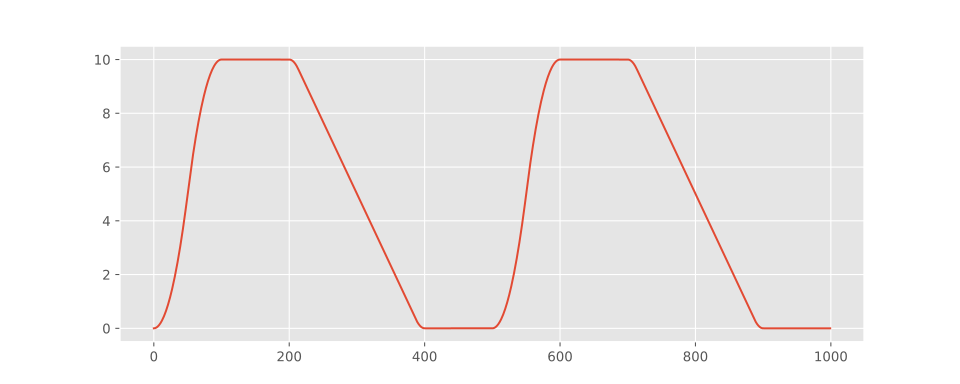
UliEngineering includes a UliEngineering.SignalProcessing.Ramp module which can be used to generate ramps including defined acceleration and decelaration profiles and the option to generate C² continous traces.
Minimal usage example:
generate_ramp.py
from UliEngineering.SignalProcessing.Ramp import periodic_ramp

# Generate signal
y = periodic_ramp(
    frequency = 2.0,
    samplerate=1000,
    amplitude=10,
    rise_time=0.1,
    fall_time=0.2,
    high_time=0.1,
    acceleration=4000,
    length=1.0,
)
Detailed example plot script
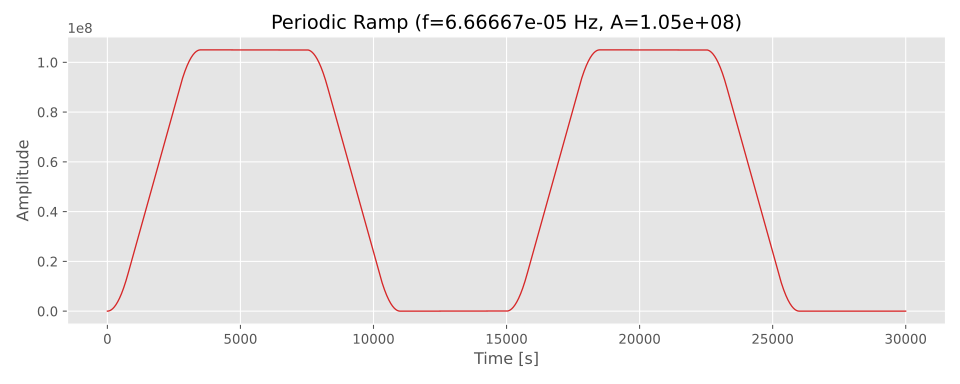
generated using this Python code
plot_ramp.py
#!/usr/bin/env python3
"""
Example script to generate and plot a periodic ramp signal using
`UliEngineering.SignalProcessing.Ramp.periodic_ramp`.

Usage:
    python3 examples/ramp_example.py

Options allow adjusting samplerate, frequency, amplitude, rise/fall times,
acceleration (knee), number of periods and output filename.
"""

import argparse
import numpy as np
import matplotlib.pyplot as plt
from UliEngineering.SignalProcessing.Ramp import periodic_ramp
plt.style.use("ggplot")

def main():
    p = argparse.ArgumentParser(description="Generate and plot a periodic ramp signal")
    p.add_argument('--samplerate', '-r', type=float, default=1.0, help='Samples per second')
    p.add_argument('--frequency', '-f', type=float, default=1.0/15000.0, help='Signal frequency in Hz')
    p.add_argument('--amplitude', '-a', type=float, default=1.05e8, help='Peak-to-peak amplitude')
    p.add_argument('--rise', type=float, default=3500.0, help='Rise time (seconds)')
    p.add_argument('--fall', type=float, default=3500.0, help='Fall time (seconds)')
    p.add_argument('--high', type=float, default=4000.0, help='High hold time (seconds)')
    p.add_argument('--acceleration', '-A', type=float, default=50.0, help='Edge acceleration (units/s^2)')
    p.add_argument('--periods', type=int, default=2, help='Number of periods to generate')
    p.add_argument('--outfile', '-o', default='ramp.svg', help='Filename to save the plot')
    args = p.parse_args()

    # Compute total length required to generate the requested number of periods
    period = 1.0 / args.frequency
    length = args.periods * period

    # Generate signal
    y = periodic_ramp(
        args.frequency,
        args.samplerate,
        amplitude=args.amplitude,
        rise_time=args.rise,
        fall_time=args.fall,
        high_time=args.high,
        acceleration=args.acceleration,
        length=length,
    )

    # Time axis
    t = np.arange(y.size) / args.samplerate

    # Plot
    plt.figure(figsize=(10, 4))
    plt.plot(t, y, color='tab:red', linewidth=1.0)
    plt.xlabel('Time [s]')
    plt.ylabel('Amplitude')
    plt.title(f'Periodic Ramp (f={args.frequency:.6g} Hz, A={args.amplitude:g})')
    plt.grid(True)
    plt.tight_layout()
    plt.savefig(args.outfile, dpi=150)
    print(f"Saved plot to {args.outfile}")

    # Show interactively (if available)
    try:
        plt.show()
    except Exception:
        pass


if __name__ == '__main__':
main()Check out similar posts by category:
Python, UliEngineering, Data Science
If this post helped you, please consider buying me a coffee or donating via PayPal to support research & publishing of new posts on TechOverflow