
Business strategy: What order size you need to aim for based on sales capacity and capital need
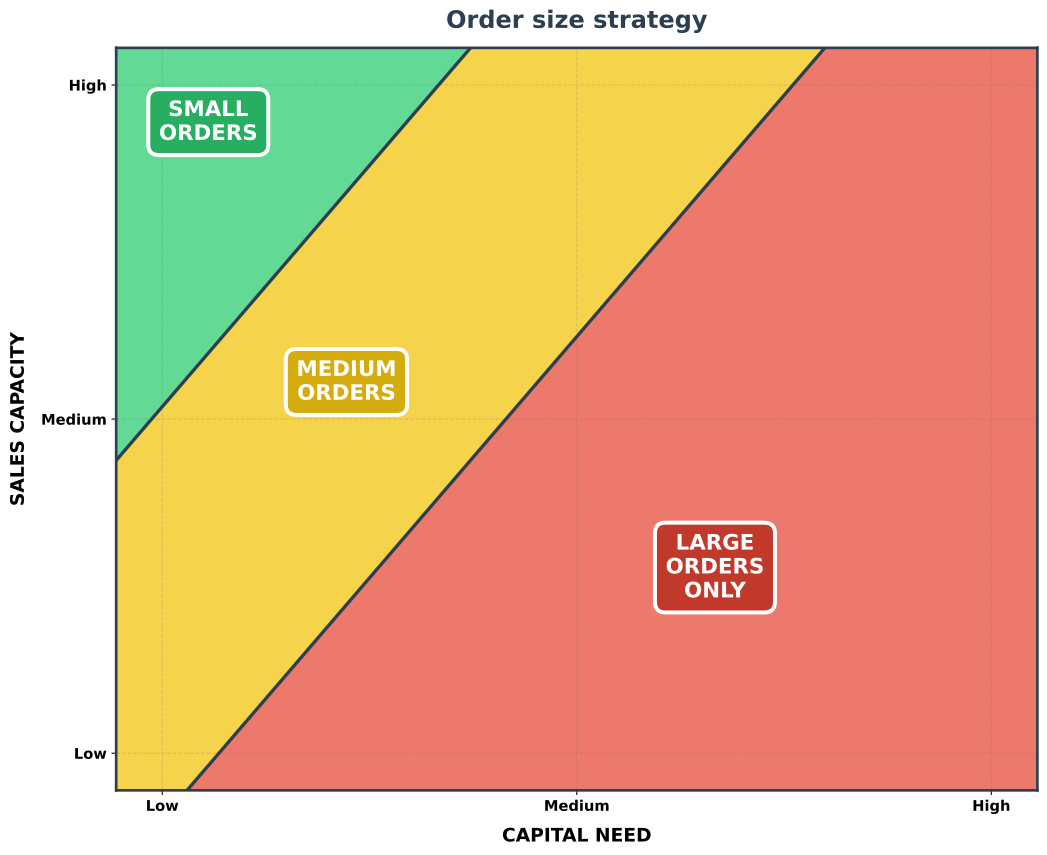
- Maps Capital Need (X) vs Sales Capacity (Y) to recommend Small / Medium / Large order strategies.
- High sales capacity + low capital need → prioritize small, high‑volume orders.
- The sales capacity allows making many deals, and small deals are often easier and quicker to close
- The low capital need means even a bunch of small orders cover costs.
- Small deals can often be replaced on a shorter notice if a customer drops out
- When opportune, one can still accept medium/large orders, and medium/large orders can be selected strategically (eg select ones which are easier to close) to boost revenue
- Low sales capacity + high capital need → focus on fewer, large account deals.
- The sales capacity only allows making a few deals
- The high capital need requires each deal to be large enough to cover the costs.
- The orange middle area suggests medium‑sized and large orders are both viable
- You can pick based on market conditions, competitive landscape, and your strengths
- Large orders typically have increased per-order risk (longer sales cycles, more negotiation, higher chance of failure)
- But large orders, when closed successfully, cover capital need more comfortably.
- Generally, large orders are more competitive, since you compete with larger players (for which medium or small orders are often not cost-effective due to their extreme capital need - as shown in this diagram) and large players can easily outcompete you in sales capacity and often have more project credibility.
- For startups: pick strategy based on this map, considering your available cash and sales bandwidth
- How much sales capacity is needed for small/medium/large orders depends on your market and business model
- Similarly, capital need fulfilled per order varies widely by industry and cost structure
- You should avoid comparing absolute order sizes across different business models and industries
- What
small ordersorlarge ordersare depends on your business model and cost structure.- Baseline: Small deal
< $10k, Medium deal$10k - $100k, Large deal> $100k - In some industries, large deals are so difficult to close that they take more sales capacity per
$earned than medium or small deals. In that case, adjust your strategy accordingly.
- Baseline: Small deal
- Special case: E-Commerce / B2C can make more small deals due to automation with slightly less sales capacity, but the customer service and fulfillment costs increase required personnel capacity per order, so the general logic still applies.
Script to generate the order size strategy chart
plot_order_size_strategy.py
#!/usr/bin/env python3
import matplotlib.pyplot as plt
import numpy as np

def create_order_size_strategy():
    """
    Creates a cleaner Order size strategy figure with better label placement.
    """

    fig, ax = plt.subplots(figsize=(11, 9))

    # Create meshgrid
    x = np.linspace(0, 10, 500)
    y = np.linspace(0, 10, 500)
    X, Y = np.meshgrid(x, y)

    Z = np.zeros_like(X)

    for i in range(len(x)):
        for j in range(len(y)):
            capital_need = X[j, i]
            sales_capacity = Y[j, i]

            # Adjusted scoring for cleaner zone boundaries
            score = (capital_need / 10) * 1.3 - (sales_capacity / 10) * 0.9 + 0.35

            if score > 0.45:
                Z[j, i] = 2  # Large orders
            elif score < -0.05:
                Z[j, i] = 0  # Small orders
            else:
                Z[j, i] = 1  # Medium orders

    colors_list = ['#2ECC71', '#F1C40F', '#E74C3C']

    # Create crisp straight-line boundaries (analytic) to avoid staggered contours
    x_line = np.linspace(0, 10, 500)

    # Based on score = 0.13*x - 0.09*y + 0.35
    def y_from_score(x, score):
        return (0.13 * x + 0.35 - score) / 0.09

    # Boundaries corresponding to the previous thresholds
    y_boundary_low = y_from_score(x_line, 0.45)   # between Large and Medium
    y_boundary_high = y_from_score(x_line, -0.05) # between Medium and Small

    # Clip to the plotting range
    y_low_clip = np.clip(y_boundary_low, 0, 10)
    y_high_clip = np.clip(y_boundary_high, 0, 10)

    # Fill regions: Large (red) below y_low, Medium (yellow) between, Small (green) above y_high
    ax.fill_between(x_line, 0, y_low_clip, where=(y_low_clip > 0), color=colors_list[2], alpha=0.75, zorder=0)
    ax.fill_between(x_line, y_low_clip, y_high_clip, where=(y_high_clip > y_low_clip), color=colors_list[1], alpha=0.75, zorder=0)
    ax.fill_between(x_line, y_high_clip, 10, where=(y_high_clip < 10), color=colors_list[0], alpha=0.75, zorder=0)

    # Draw the straight boundary lines
    ax.plot(x_line, y_boundary_low, color='#2C3E50', linewidth=2.5)
    ax.plot(x_line, y_boundary_high, color='#2C3E50', linewidth=2.5)

    # ==========================================
    # ZONE LABELS - Properly centered
    # ==========================================

    # Small Orders - Top Left
    ax.text(1.0, 9, 'SMALL\nORDERS', fontsize=16, fontweight='bold',
            ha='center', va='center', color='white',
            bbox=dict(boxstyle='round,pad=0.5', facecolor='#27AE60',
                     edgecolor='white', linewidth=3))

    # Medium Orders - Center diagonal
    ax.text(2.5, 5.5, 'MEDIUM\nORDERS', fontsize=16, fontweight='bold',
            ha='center', va='center', color='white',
            bbox=dict(boxstyle='round,pad=0.5', facecolor='#D4AC0D',
                     edgecolor='white', linewidth=3))

    # Large Orders - Bottom Right
    ax.text(6.5, 3, 'LARGE\nORDERS\nONLY', fontsize=16, fontweight='bold',
            ha='center', va='center', color='white',
            bbox=dict(boxstyle='round,pad=0.5', facecolor='#C0392B',
                     edgecolor='white', linewidth=3))

    # ==========================================
    # Axis setup
    # ==========================================
    ax.set_xlim(0, 10)
    ax.set_ylim(0, 10)
    ax.set_xlabel('CAPITAL NEED', fontsize=14, fontweight='bold', labelpad=10)
    ax.set_ylabel('SALES CAPACITY', fontsize=14, fontweight='bold', labelpad=10)

    # Tick labels
    ax.set_xticks([0.5, 5, 9.5])
    ax.set_xticklabels(['Low', 'Medium', 'High'], fontsize=11, fontweight='bold')
    ax.set_yticks([0.5, 5, 9.5])
    ax.set_yticklabels(['Low', 'Medium', 'High'], fontsize=11, fontweight='bold')

    # Title
    ax.set_title('Order size strategy',
                 fontsize=18, fontweight='bold', color='#2C3E50', pad=15)

    # Directional arrow removed to reduce visual clutter

    # Style
    for spine in ax.spines.values():
        spine.set_linewidth(2)
        spine.set_color('#2C3E50')

    # Subtle grid
    ax.grid(True, alpha=0.2, linestyle='--', color='#666666')

    plt.tight_layout()
    plt.subplots_adjust(bottom=0.08)

    return fig, ax


if __name__ == "__main__":
    print("Creating clean Order size strategy...")

    fig, ax = create_order_size_strategy()
    fig.savefig('order_size_strategy.svg', bbox_inches='tight',
                facecolor='white', edgecolor='none')
    print("✓ Saved: order_size_strategy.png")

plt.show()Check out similar posts by category:
Business
If this post helped you, please consider buying me a coffee or donating via PayPal to support research & publishing of new posts on TechOverflow