


ROOT C++ TButton API vám umožňuje pouze předat method řetězec do TButton objektu, který je interpretován CINT interpretem. Zatímco to je flexibilní v některých ohledech, neposkytuje žádné prostředky pro předání lambda nebo funkčního pointeru do tlačítka.
Řešení je odvodit vlastní třídu z TButton a přepsat jeho TButton::ExecuteEvent() funkci. Většina event handleru by měla být zkopírována z originální TButton::ExecuteEvent() funkce, s pouze
gROOT->ProcessLine(GetMethod());nahrazeným
clickCallback()Jako callback member používáme std::function<void()> objekt, který je - v kontrastu s C funkčním pointerem - schopen ukládat lambdas s kontextem, tj. předávat parametry do callbacku.
Kompletní kód
TButtonWithCallback.hpp
#pragma once

#include <TButton.h>
#include <functional>

/**
 * Custom TButton class that allows setting a callback function
 * (instead of an interpreted string) to be called when the button is clicked.
 */
class TButtonWithCallback : public TButton {
    friend class TButton;
public:
    TButtonWithCallback(const char *title, std::function<void()> clickCallback, Double_t x1, Double_t y1, Double_t x2, Double_t y2);
    void ExecuteEvent(Int_t event, Int_t px, Int_t py) override;

private:
    std::function<void()> clickCallback;
    bool fFocused = false;
};
TButtonWithCallback.cpp
#include "TButtonWithCallback.hpp"
#include <TROOT.h>
#include <TVirtualPad.h>
#include <TCanvas.h>

TButtonWithCallback::TButtonWithCallback(const char *title, std::function<void()> clickCallback, Double_t x1, Double_t y1, Double_t x2, Double_t y2)
    : TButton(title, "(void)0;", x1, y1, x2, y2), clickCallback(clickCallback) {}

void TButtonWithCallback::ExecuteEvent(Int_t event, Int_t px, Int_t py) {
    //check case where pressing a button deletes itself
    if (ROOT::Detail::HasBeenDeleted(this)) return;

    if (IsEditable()) {
        TPad::ExecuteEvent(event,px,py);
        return;
    }

    auto cdpad = gROOT->GetSelectedPad();
    HideToolTip(event);

    switch (event) {

    case kMouseEnter:
        TPad::ExecuteEvent(event,px,py);
        break;

    case kButton1Down:
        SetBorderMode(-1);
        fFocused = kTRUE;
        Modified();
        Update();
        break;

    case kMouseMotion:

        break;

    case kButton1Motion:
        if (px<XtoAbsPixel(1) && px>XtoAbsPixel(0) &&
            py<YtoAbsPixel(0) && py>YtoAbsPixel(1)) {
            if (!fFocused) {
                SetBorderMode(-1);
                fFocused = kTRUE;
                Modified();
                GetCanvas()->Modified();
                Update();
            }
        } else if (fFocused) {
            SetBorderMode(1);
            fFocused = kFALSE;
            Modified();
            GetCanvas()->Modified();
            Update();
        }
        break;

    case kButton1Up:
        SetCursor(kWatch);
        if (fFocused) {
            TVirtualPad::TContext ctxt(cdpad, kTRUE, kTRUE);
            clickCallback();
        }
        //check case where pressing a button deletes itself
        if (ROOT::Detail::HasBeenDeleted(this)) return;
        SetBorderMode(1);
        Modified();
        Update();
        SetCursor(kCross);
        break;
    }
}
Kompletní příklad použití
Tento příklad má kód sloučený do jednoho souboru
#include <TApplication.h>
#include <TCanvas.h>
#include <TButton.h>
#include <iostream>
#include "TSystem.h"
#include <TROOT.h>
#include <functional>

using std::cout;
using std::endl;

/**
 * Custom TButton class that allows setting a callback function
 * (instead of an interpreted string) to be called when the button is clicked.
 */
class TButtonWithCallback : public TButton {
    friend class TButton;
public:
    TButtonWithCallback(const char *title, std::function<void()> clickCallback, Double_t x1, Double_t y1, Double_t x2, Double_t y2)
        : TButton(title, "(void)0;", x1, y1, x2, y2), clickCallback(clickCallback) {}

    void ExecuteEvent(Int_t event, Int_t px, Int_t py) override {
        //check case where pressing a button deletes itself
        if (ROOT::Detail::HasBeenDeleted(this)) return;

        if (IsEditable()) {
            TPad::ExecuteEvent(event,px,py);
            return;
        }

        auto cdpad = gROOT->GetSelectedPad();
        HideToolTip(event);

        switch (event) {

        case kMouseEnter:
            TPad::ExecuteEvent(event,px,py);
            break;

        case kButton1Down:
            SetBorderMode(-1);
            fFocused = kTRUE;
            Modified();
            Update();
            break;

        case kMouseMotion:

            break;

        case kButton1Motion:
            if (px<XtoAbsPixel(1) && px>XtoAbsPixel(0) &&
                py<YtoAbsPixel(0) && py>YtoAbsPixel(1)) {
                if (!fFocused) {
                    SetBorderMode(-1);
                    fFocused = kTRUE;
                    Modified();
                    GetCanvas()->Modified();
                    Update();
                }
            } else if (fFocused) {
                SetBorderMode(1);
                fFocused = kFALSE;
                Modified();
                GetCanvas()->Modified();
                Update();
            }
            break;

        case kButton1Up:
            SetCursor(kWatch);
            if (fFocused) {
                TVirtualPad::TContext ctxt(cdpad, kTRUE, kTRUE);
                clickCallback();
            }
            //check case where pressing a button deletes itself
            if (ROOT::Detail::HasBeenDeleted(this)) return;
            SetBorderMode(1);
            Modified();
            Update();
            SetCursor(kCross);
            break;
        }
    }

private:
    std::function<void()> clickCallback;
    // Clone of TButton::fFocused which is private
    bool fFocused = false;
};

int main(int argc, char **argv) {
    // Initialize the ROOT application
    TApplication app("ROOT Application", &argc, argv);

    // Create a canvas for displaying the button
    TCanvas *canvas = new TCanvas("canvas", "Button Example", 800, 600);

    // Create a button and set its callback function
    TButtonWithCallback *button = new TButtonWithCallback("Click Me", [&]() {
        cout << "Button clicked!" << endl;
    }, 0.1, 0.1, 0.3, 0.2);
    button->Draw(); // Draw the button on the canvas

    // Update the canvas to display the button
    canvas->Modified();
    canvas->Update();

    // Run the application event loop
    app.Run();

    return 0;
}
Zkompilujte kód pomocí
g++ -o button_example button_example.cpp `root-config --cflags --libs`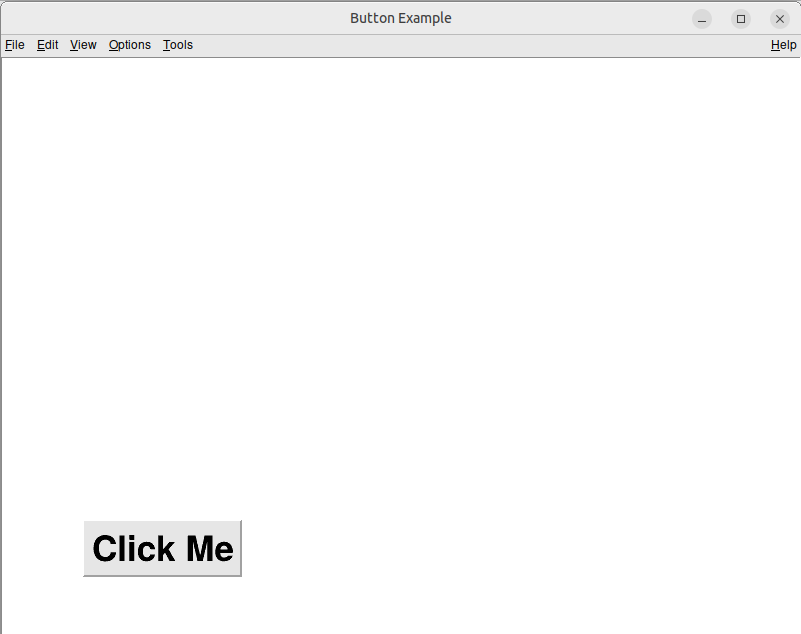
Když kliknete na tlačítko,
Button clicked!bude vypsáno do konzole.
