
Netgear GS710TUP: SNMPv3-Informationen mit pySNMP abfragen
English
Deutsch
Installiere zunächst pysnmp mit
pip_install_pysnmp.sh
pip install pysnmpAuf dem Netgear GS710TUP habe ich SNMPv3 ohne Verschlüsselung/Privacy, aber mit SHA1-Authentifizierung aktiviert, wie bereits in unserem vorherigen Artikel Simple SNMPv3 client example for Netgear GS710TUP beschrieben:
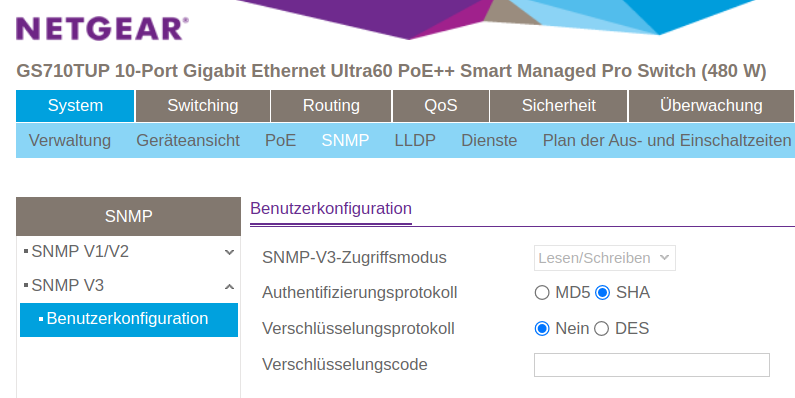
Mit pysnmp kannst du das Gerät wie folgt abfragen (verwende das Standard-Admin-Passwort, mit dem du dich auch am Router anmeldest):
pysnmp_getcmd_example.py
#!/usr/bin/env python3
import pysnmp.hlapi as snmp

iterator = snmp.getCmd(
    snmp.SnmpEngine(),
    snmp.UsmUserData('admin', 'SWITCH_ADMIN_PASSWORD',
                     authProtocol=snmp.usmHMACSHAAuthProtocol,
                     privProtocol=snmp.usmNoPrivProtocol),
    snmp.UdpTransportTarget(('SWITCH_IP_ADDRESS', 161)),
    snmp.ContextData(),
    snmp.ObjectType(snmp.ObjectIdentity('SNMPv2-MIB', 'sysDescr', 0))
)

errorIndication, errorStatus, errorIndex, varBinds = next(iterator)

if errorIndication:
    print(errorIndication)
elif errorStatus:
    idx = int(errorIndex) - 1
    location = errorIndex and varBinds[idx][0] or '?'
    print(f"{errorStatus.prettyPrint()} at {location}")
else: # Success
    for varBind in varBinds:
print(' = '.join([x.prettyPrint() for x in varBind]))Beispielausgabe:
snmp_sysdescr_example.txt
SNMPv2-MIB::sysDescr.0 = GS710TUP 10-Port Gigabit Ethernet Ultra60 PoE++ Smart Managed Pro Switch (480W), Software Version 1.0.5.9, Boot Version 1.0.0.9Check out similar posts by category:
Networking, Python, SNMP
If this post helped you, please consider buying me a coffee or donating via PayPal to support research & publishing of new posts on TechOverflow