
Streamlit: Wie man einen Subprocess mit Live-stdout-Anzeige im Web-UI ausführt
Dieses Beispiel verwendet asyncio, um einen Subprocess auszuführen und seine Ausgabe live in einem Streamlit-Web-UI anzuzeigen (während der Befehl noch läuft). Dies ist nützlich für langlaufende Prozesse, bei denen Sie die Ausgabe anzeigen möchten, sobald sie eintrifft.
streamlit_subprocess_live_output.py
import streamlit as st
import asyncio

async def run_subprocess():
    # Create placeholder for live output
    output_placeholder = st.empty()
    accumulated_output = []

    process = await asyncio.create_subprocess_exec(
        'ping', '-c', '10', '1.1.1.1',
        stdout=asyncio.subprocess.PIPE,
        stderr=asyncio.subprocess.PIPE,
    )

    # Read stdout stream
    while True:
        line = await process.stdout.readline()
        if not line:
            break

        line = line.decode().strip()
        accumulated_output.append(line)

        # Update display with all output so far
        output_placeholder.code('\n'.join(accumulated_output))

    # Get any remaining output and errors
    stdout, stderr = await process.communicate()
    if stderr:
        st.write("Subprocess errors:")
        st.code(stderr.decode())

async def main():
    st.write("Running subprocess...")
    await run_subprocess()

if __name__ == '__main__':
    asyncio.run(main())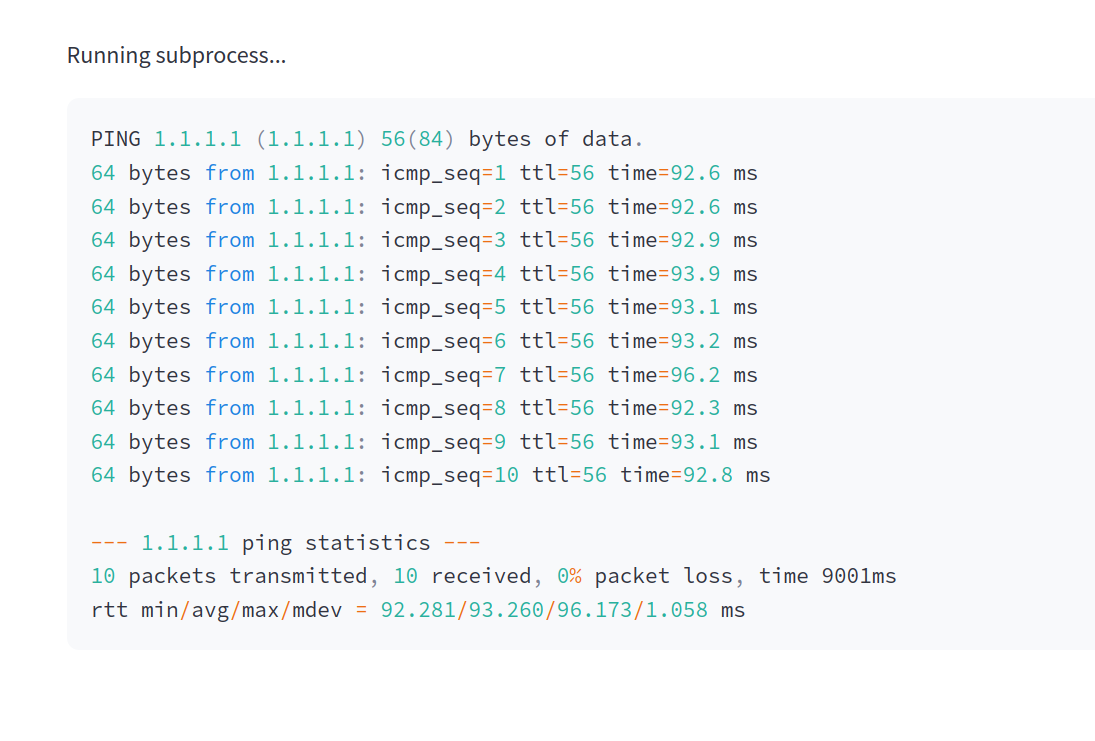
If this post helped you, please consider buying me a coffee or donating via PayPal to support research & publishing of new posts on TechOverflow