
将 Pandas DataFrame 转换为自定义 LaTeX tabular
问题:
你需要将 pandas DataFrame 转换为 LaTeX 表格。你想在表中包含 pandas 列和行标签。
解决方案
查看 Pandas to_latex 函数,它应该适合大多数用途。
此处提供的脚本可用作将 Python 数据结构转换为完全自定义的 LaTeX tabular 或任何类似 LaTeX 结构的构建块。
默认情况下它生成这样的表:
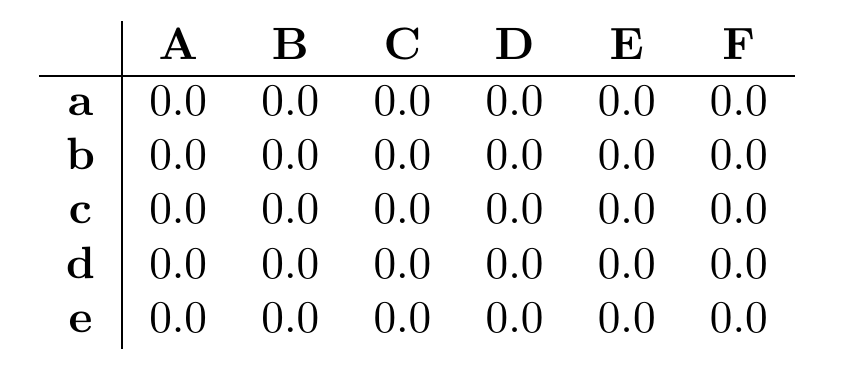
pandas_to_latex.py
#!/usr/bin/env python3
"""
将 pandas DataFrames 转换为 LaTeX {tabular}。
不需要任何外部 LaTeX 包

版本 1.1:Python3 就绪
"""
import pandas
import io #用作缓冲区

__author__  = "Uli Köhler"
__license__ = "Apache License v2.0"

def convertToLaTeX(df, alignment="c"):
    """
    将 pandas dataframe 转换为 LaTeX tabular。
    以粗体打印标签,不使用数学模式
    """
    numColumns = df.shape[1]
    numRows = df.shape[0]
    output = io.StringIO()
    colFormat = ("%s|%s" % (alignment, alignment * numColumns))
    #写入标题
    output.write("\\begin{tabular}{%s}\n" % colFormat)
    columnLabels = ["\\textbf{%s}" % label for label in df.columns]
    output.write("& %s\\\\\\hline\n" % " & ".join(columnLabels))
    #写入数据行
    for i in range(numRows):
        output.write("\\textbf{%s} & %s\\\\\n"
                     % (df.index[i], " & ".join([str(val) for val in df.ix[i]])))
    #写入页脚
    output.write("\\end{tabular}")
    return output.getvalue()

if __name__ == "__main__":
    import numpy
    #示例代码
    array = numpy.zeros((5,6))
    df = pandas.DataFrame(array, index=list("abcde"), columns=list("ABCDEF"))
print(convertToLaTeX(df))If this post helped you, please consider buying me a coffee or donating via PayPal to support research & publishing of new posts on TechOverflow