
从电阻精确计算 PT100/PT1000 温度
给不耐烦读者的太长不看
PT100/PT1000 temperatures calculation suffers from accuracy issues for large sub-zero temperatures. UliEngineering implements a polynomial-fit based algorithm to provide $58.6 \mu{\degree}C$ peak-error over the full defined temperature range from -200 {\degree}C to +850\u00a0\u00b0C.
Use this code snippet (replace pt1000_ by pt100- to use PT100 coefficients) to compute an accurate temperature (in degrees celsius) e.g. for a resistane of 829.91 \u03a9 of a PT1000\u00a0sensor.
from UliEngineering.Physics.RTD import pt1000_temperature
# 以下调用是等效的并打印 -43.2316359463
print(pt1000_temperature("829.91 \u2126"))
print(pt1000_temperature(829.91))你使用以下命令安装该库(兼容 Python 3.2+)
pip install -U UliEngineering问题
从温度计算 PT100/PT1000 电阻的公式是众所周知的(参见例如 Thermometrics):
$R_t,=,R_0\cdot(1,+,A\cdot t,+,B\cdot t^2,+,C\cdot (t-100)\cdot t^3)$
where $t$ is the temperature, $R_0$ is the zero-\degreeC resistance (i.e. 100 \u03a9 for PT100 and 1000 \u03a9 for PT1000).
其余参数 A、B 和 C 取决于使用的温度标准,可能由传感器制造商测量以获得额外精度。对于 ITU-90 标准,它们等于(参见例如 code10.info)
$$\begin{array}{lll}A&=&3.9083\cdot10^{-3}\\B\,&=&\,-5.7750\cdot10^{-7}\\C\,&=&\,\begin{cases}-4.1830\cdot 10^{-12}&\text{for}\ t&\lt& 0{\degree}C\\0.0&\text{for}\ t &\geq&\;0\;{\degree}C\end{cases}\end{array}$$此外,对于温度 > 0°C,$C$ 设置为 0,将公式简化为:
$$R_t\,=\,R_0\cdot(1\,+\,A\cdot t\,+\,B\cdot t^2)$$显然,给定此信息,可以无误差项地计算给定温度下的电阻。
当尝试在一般情况下求解方程时出现问题。
$$t\,=\,\frac{-R_0\cdot\,a\,+\,\sqrt{R_0^2\cdot a^2\,-\,4\cdot R_0\cdot B\cdot (R_0-R_t)}}{2\cdot R_0\cdot b}$$虽然 $t\lt0 {\degree}C$ 的公式有精确的代数解,但它太大了可能无法在屏幕上显示。因此,实现此公式被认为不可行,因为人们会为精确解牺牲简单性和速度。
然而,给定传感器只能工作到一定精度是固有的。因此,对于所有实际应用,具有足够精度的近似解是足够的。
解决方案:将多项式拟合到误差函数
起初我考虑实现一个迭代函数来细化初始温度猜测。虽然此方法肯定可行,因为精确误差函数可用,但它不能很好地扩展且没有确定性运行时间。
让我们可视化没有任何校正项时存在的误差函数。由于 $C$ 项在 $t\geq0{\degree}C$ 时归约为 0,我们只对 -200 °C 到 0°C 的范围感兴趣(PT100/PT1000 传感器在相关标准中未定义低于 -200°C,但原则上此方法可延伸到 0°K)。
我要介绍的方法 — 以及验证它所需的所有工具 — 在我的 UliEngineering 库的 UliEngineering.Physics.RTD 模块中实现。
使用 matplotlib 和 UliEngineering,只需 12 行代码即可生成此图:
import matplotlib.pyplot as plt
from UliEngineering.Physics.RTD import *
import numpy as np
plt.style.use("ggplot")
plt.gcf().set_size_inches(12, 4)
plt.title("未校正的 PT1000 误差")
plt.ylabel("相对误差 [°C]")
plt.xlabel("绝对实际温度 [°C]")
# 创建 1M 参考温度数据点
temp = np.linspace(-200.0, 0.0, 1000000)
# 绘制偏差:参考温度 - 计算温度
x, y, _ = checkCorrectionPolynomialQuality(1000.0, temp, poly=noCorrection)
plt.plot(temp, y)
plt.savefig("PT1000-uncorrected.svg")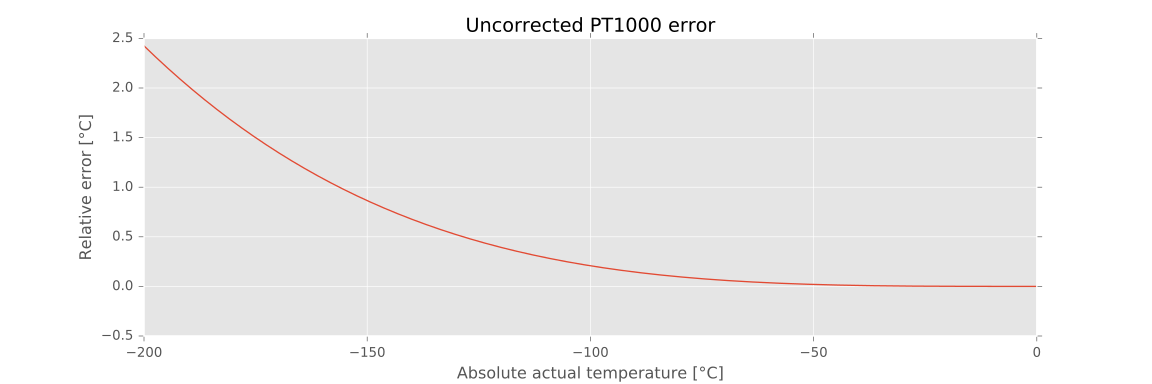
我们用罐装的 noCorrection 多项式调用 checkCorrectionPolynomialQuality(),该多项式始终求值为零:在此配置中,函数从我们的参考温度计算电阻,然后从所述电阻重新计算实际参考温度值。它返回三个值:- 对应于我们参考温度的电阻 numpy 数组 - 任何给定电阻/温度下与参考温度的差异的 numpy 数组,以 °C 为单位 - 峰值绝对值标量质量指标(即要期望的最坏误差是什么)
很容易观察到,虽然误差在 -200°C 时达到几乎 2.5°C,但它是单调且均匀连续的。
因此我们的方法包括在此函数上拟合多项式,使用 np.polyfit 最小化与参考温度的差异。
此算法在 UliEngineering 的 computeCorrectionPolynomial() 函数中可用。已通过实验确定,5 次多项式显示的结果明显优于更高或更低次多项式的结果。尽管如此,如果你打算试验参数,该函数允许你指定自定义次数。
plt.gcf().clf() # 清除当前图形
plt.gcf().set_size_inches(12, 4)
plt.title("多项式校正的 PT1000 误差")
plt.ylabel("Relative error [°C]")
plt.xlabel("Absolute actual temperature [°C]")
# 计算校正势
mypoly = computeCorrectionPolynomial(1000.0)
# 绘制偏差:参考温度 - 计算温度
_, y, pp = checkCorrectionPolynomialQuality(1000.0, temp, poly=mypoly)
plt.plot(temp, y)
plt.savefig("PT1000-corrected.svg")
print("峰峰值误差:{0}".format(pp))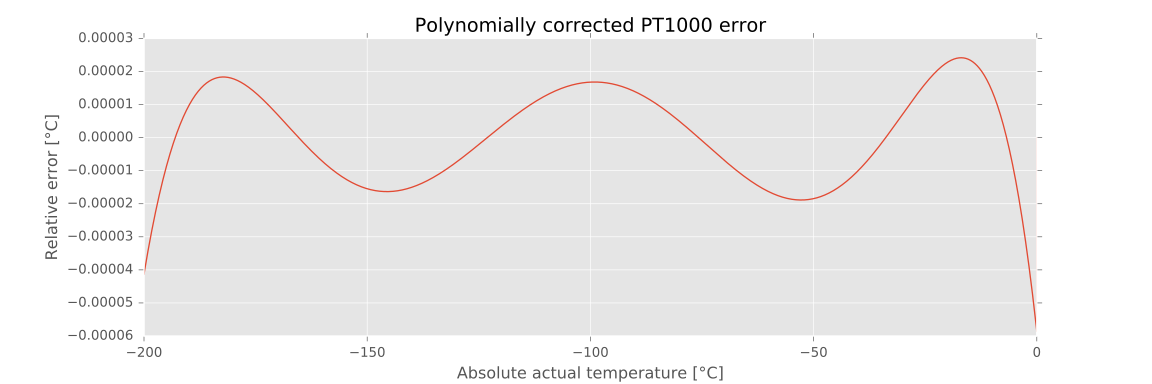
可以清楚地看到,剩余误差现在非常小:其在整个定义温度范围内的峰值绝对值仅为 $58.6,\mu{\degree}C$。这被认为对于计量中参考温度测量以外的所有实际应用都是足够的(即使在那里几十微度。
对于一个简单的(且相对快速计算的)5 次多项式,这些结果惊人地好。UliEngineering 库的当前 git 版本通过使用预计算多项式实现此算法,如果你将 $R_0=100.0$ 或 $R_0=1000.0$ 传递给 ptx_temperature(),这些多项式会自动选择,ptx_temperature() 内部由 pt100_temperature() 和 pt1000_temperature() 调用。对于其他 $R_0$ 值,你需要手动计算多项式并将其传递给 ptx_temperature()。
当然,NumPy 数组和类似对象也可以传递给 UliEngineering 中的函数。