
如何使用 Pandas 在 Python 中读取 IDF 糖尿病统计数据
国际糖尿病基金会 提供了一个数据门户,包含与糖尿病相关的各种统计数据。
在这篇文章中,我们将展示如何使用 pandas 读取 CSV 格式的 Diabetes estimates (20-79 y) / People with diabetes, in 1,000s 数据导出。
首先从数据页面下载 IDF (people-with-diabetes--in-1-000s).csv。
现在我们可以解析 CSV 文件:
parse_idf_csv.py
import pandas as pd

# 从 https://www.diabetesatlas.org/data/en/indicators/1/ 下载
df = pd.read_csv("IDF (people-with-diabetes--in-1-000s).csv")
# 解析年份列以获取浮点数并乘以千位因子。Pandas 无法解析类似 "12,345.67" 的值
for column in df.columns:
    try:
        int(column)
        df[column] = df[column].apply(lambda s: None if s == "-" else float(s.replace(",", "")) * 1000)
    except:
pass如你在后处理步骤中所见,CSV 中糖尿病患者数量以千为单位给出,因此我们将其乘以 1000 以获取实际数字。
如果你想修改数据列(即引用年份的列),你可以使用此简单模板:
modify_year_columns.py
for column in df.columns:
    try:
        int(column) # 如果列不是年份数字将引发 ValueError()
        # 你在这里做的任何操作只会应用于年份列
        df[column] = df[column] * 0.75 # 如何修改列的示例
        # 但注意如果你的代码引发异常,它将被忽略!
    except:
pass让我们绘制一些数据:
plot_diabetes_by_region.py
regions = df[df["Type"] == "Region"] # 仅区域,不包括单个国家

from matplotlib import pyplot as plt
plt.style.use("ggplot")
plt.gcf().set_size_inches(20,4)
plt.ylabel("糖尿病患者 [百万]")
plt.xlabel("区域")
plt.title("2019 年各区域糖尿病患者")
plt.bar(regions["Country/Territory"], regions["2019"] / 1e6)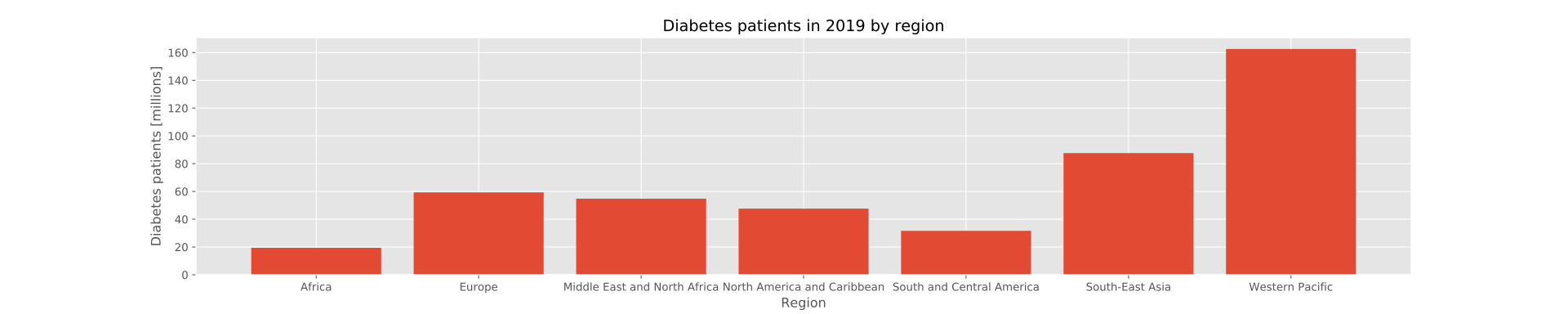 注意如果你使用比我使用的版本更新的数据集,
2019 列可能不存在于你的 CSV 文件中。在这种情况下选择适当的列。
Check out similar posts by category:
Bioinformatics, Pandas, Python
If this post helped you, please consider buying me a coffee or donating via PayPal to support research & publishing of new posts on TechOverflow