
如何将 Pandas 数据集导出到 SQLite 数据库
在我们的上一篇文章中,我们展示了如何使用 sqlalchemy 连接到 SQLite 数据库。
在这篇博文中,我们将展示如何将 pandas DataFrame - 例如我们的时间序列示例数据集 - 导出到 SQLite 数据库。
首先,我们将加载示例数据框:
how-to-export-pandas-dataset-to-sqlite-database.py
import pandas as pd
# 加载预构建的时间序列示例数据集
df = pd.read_csv("https://datasets.techoverflow.net/timeseries-example.csv", parse_dates=["Timestamp"])
df.set_index("Timestamp", inplace=True)现在我们可以如上一篇文章所示打开 SQLite 数据库
export_sqlalchemy_engine.py
import sqlalchemy
db = sqlalchemy.create_engine('sqlite:///timeseries.db')并将 DataFrame 导出到数据库:
df_to_sql.py
df.to_sql('timeseries', db, if_exists="replace")我总是建议使用 if_exists="replace"(即如果表已存在,则替换它)以加快开发过程。
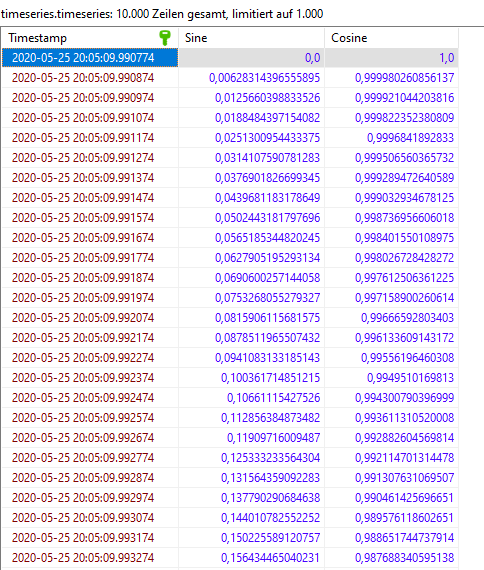
在 HeidiSQL 等 SQLite 查看器中查看时,数据库看起来像这样:
完整代码示例
export_to_sqlite_complete.py
import pandas as pd
# 加载预构建的时间序列示例数据集
df = pd.read_csv("https://datasets.techoverflow.net/timeseries-example.csv", parse_dates=["Timestamp"])
df.set_index("Timestamp", inplace=True)

import sqlalchemy
db = sqlalchemy.create_engine('sqlite:///timeseries.db')

df.to_sql('timeseries', db, if_exists="replace")If this post helped you, please consider buying me a coffee or donating via PayPal to support research & publishing of new posts on TechOverflow