
如何在 pandas XLSX 导出中居中对齐所有列
在我们之前的文章如何在 pandas XLSX 导出中居中对齐列中,我们展示了如何在 XLSX 导出中居中对齐一个特定列。
在这篇文章中,我们将展示如何在 pandas DataFrame XLSX 导出中居中所有列。注意此处显示的带索引和不带索引的变体仅在列索引计算上不同。Pandas 自动居中索引列,因此我们不需要显式执行此操作。
带索引导出
center_all_columns.py
# 居中所有列
for column_idx in range(len(df.columns)):
    for cell in sheet[openpyxl.utils.cell.get_column_letter(column_idx + 1)]:
cell.alignment = Alignment(horizontal="center")不带索引导出
center_all_columns_no_index.py
# 居中所有列
for column_idx in range(len(df.columns)):
    for cell in sheet[openpyxl.utils.cell.get_column_letter(column_idx + 1)]:
cell.alignment = Alignment(horizontal="center")完整示例:
pandas_center_example.py
import pandas as pd
import openpyxl.utils.cell
from openpyxl.styles.alignment import Alignment

df = pd.DataFrame([
    {"a": 1.0},
    {"a": 2.0},
    {"a": 3.0},
    {"a": 4.0},
    {"a": 5.0},
])
with pd.ExcelWriter("out.xlsx", engine="openpyxl") as writer:
    sheet_name = "Bool"
    # 导出 DataFrame 内容
    df.to_excel(writer, sheet_name=sheet_name)
    # 居中对齐
    sheet = writer.sheets[sheet_name]
    # 居中所有列
    for column_idx in range(len(df.columns) + 1):
        for cell in sheet[openpyxl.utils.cell.get_column_letter(column_idx + 1)]:
cell.alignment = Alignment(horizontal="center")启用居中后表格将如下所示:
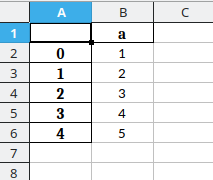
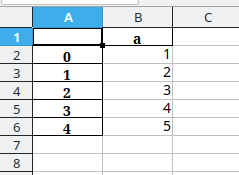
而禁用居中代码时表格右对齐,只有标题被 Pandas 居中: - 注意索引列自动居中
If this post helped you, please consider buying me a coffee or donating via PayPal to support research & publishing of new posts on TechOverflow