
如何使用 Arduino / PlatformIO 通过 I2C 访问 LAN9303 寄存器
LAN9303 在访问其寄存器时有一些特性。本文将不涵盖间接寄存器访问,仅涵盖通过 I2C 直接可访问的寄存器。注意此前提条件是将 LAN9303 配置为启用通过 I2C 从接口管理的模式。有关如何执行此操作的更多信息,请参见如何使 LAN9303 进入 I2C 管理模式。
要点是你不要在 I2C 地址字节中写入数据手册中的寄存器偏移量(例如 Chip ID 和修订寄存器的 0x50),而是写入地址除以 4(0x50 >> 2 == 0x14)。这由数据手册中的图 8-8 证明,版权 Microchip,将地址字节列为 A[9:2] 而不是标准的 A[7:0]:
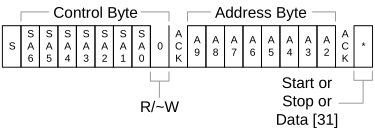
使用 Wire 库在 Arduino 中访问偏移 0x50(Chip ID 和修订寄存器)处寄存器的示例:
lan9303_i2c_example.cpp
const uint8_t LAN9303_I2C_ADDRESS = 0b1010;
const uint16_t LAN9303_CHIPID_REV_Register = 0x50;

Wire.beginTransmission(LAN9303_I2C_ADDRESS);
Wire.write(LAN9303_CHIPID_REV_Register >> 2);
Wire.endTransmission();
Wire.requestFrom(LAN9303_I2C_ADDRESS, 4); // This register is 32 bits = 4 bytes long
delay(5); // Wait for data to be available

// 直接读入 uint8_t
uint32_t buf;
size_t actually_read = Wire.readBytes((uint8_t*)&buf, 4);
// 检查我们是否收到了所有 4 个字节
if(actually_read != 4) {
    Serial.println("未读取足够的字节");
}

// 打印寄存器值
Serial.printf("LAN9303 Chip ID and revision: %08lx\r\n", __builtin_bswap32(buf));这将打印
output.txt
LAN9303 Chip ID and revision: 93030001换句话说:Chip ID = 0x9303,修订 = 0x0001
Check out similar posts by category:
Arduino, C/C++, Electronics, Embedded, Networking, PlatformIO
If this post helped you, please consider buying me a coffee or donating via PayPal to support research & publishing of new posts on TechOverflow