
如何在 MikroTik RouterOS 上检查有多少可用闪存空间
使用 WebFig (Web UI)
点击左侧的 System,然后点击 Resources。你可以看到闪存上的可用空间为 Free HDD Space:
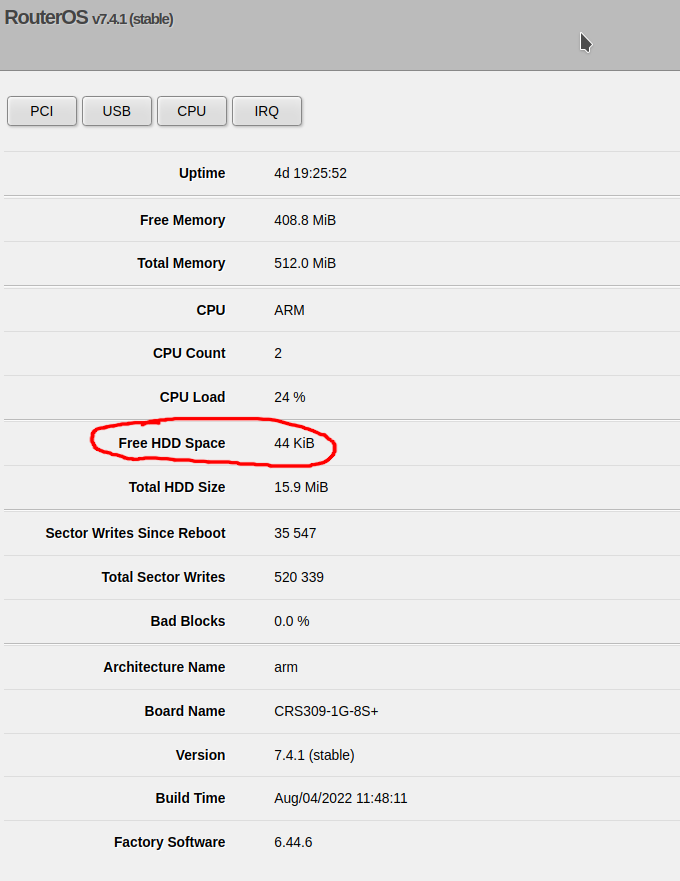
使用命令行
输入以下命令:
routeros_resource_print.rsc
/system resource print并查找 free-hdd-space 行 - 例如:
routeros_resource_output.rsc
[admin@CoreSwitch01] > /system resource print
                   uptime: 4d19h26m41s
                  version: 7.4.1 (stable)
               build-time: Aug/04/2022 11:48:11
         factory-software: 6.44.6
              free-memory: 408.7MiB
             total-memory: 512.0MiB
                      cpu: ARM
                cpu-count: 2
                 cpu-load: 26%
           free-hdd-space: 44.0KiB
          total-hdd-space: 15.9MiB
  write-sect-since-reboot: 35547
         write-sect-total: 520339
               bad-blocks: 0%
        architecture-name: arm
               board-name: CRS309-1G-8S+
platform: MikroTikCheck out similar posts by category:
MikroTik, Networking
If this post helped you, please consider buying me a coffee or donating via PayPal to support research & publishing of new posts on TechOverflow