
如何修复 MikroTik RouterOS v7 SSH 端口转发不工作:Connection refused
在运行 RouterOS v7.5 的多个型号的 MikroTik 路由器中,运行简单的 SSH 端口转发命令如时,我收到Error: Connection refused
mikrotik_ssh_forward.sh
ssh [email protected] -L 8080:192.168.178.1:80但在 RouterLS 日志中我可以看到多个 local forwarding forbidden 错误消息:

解决方案
在这种情况下,解决方案很简单:在 WebFig 或 Winbox 中转到 IP -> SSH 并将 Forwarding Enabled 设置为 Both 并点击 Apply。
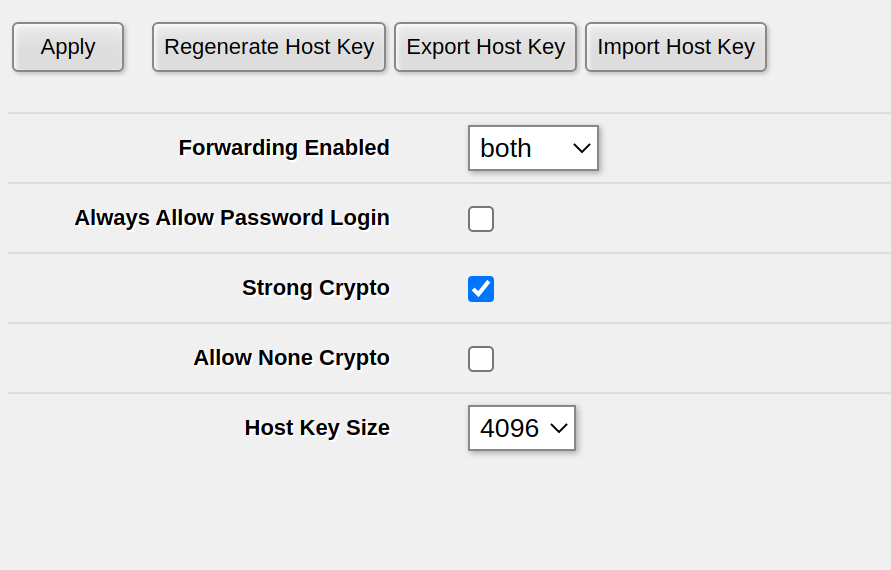 **如果你已经将
 Forwarding Enabled 设置为 Both 或 Local,**在我的一台路由器上此设置未正确激活 - 可能是在 RouterOS 升级后。为了修复此问题,将 Forwarding Enabled 设置为 no,点击 Apply,然后将 Forwarding Enabled 设置为 Both 并再次点击 Apply。对我来说,这修复了无法进行 SSH 端口转发的问题。
Check out similar posts by category:
MikroTik, Networking
If this post helped you, please consider buying me a coffee or donating via PayPal to support research & publishing of new posts on TechOverflow