
如何使用 pySNMP 从 Netgear GS710TUP 查询 SNMPv3 信息
首先,使用以下命令安装 pysnmp
pip_install_pysnmp.sh
pip install pysnmp在 Netgear GS710TUP 上,我启用了无加密/隐私但有 SHA1 认证的 SNMPv3,如我们之前的文章Netgear GS710TUP 的简单 SNMPv3 客户端示例所述:
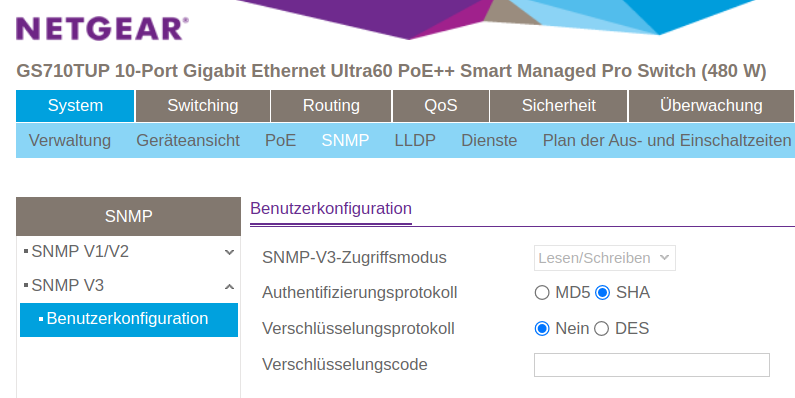
使用 pysnmp,你可以这样查询设备(使用你也用于登录路由器的标准管理员密码:
pysnmp_getcmd_example.py
#!/usr/bin/env python3
import pysnmp.hlapi as snmp

iterator = snmp.getCmd(
    snmp.SnmpEngine(),
    snmp.UsmUserData('admin', 'SWITCH_ADMIN_PASSWORD',
                     authProtocol=snmp.usmHMACSHAAuthProtocol,
                     privProtocol=snmp.usmNoPrivProtocol),
    snmp.UdpTransportTarget(('SWITCH_IP_ADDRESS', 161)),
    snmp.ContextData(),
    snmp.ObjectType(snmp.ObjectIdentity('SNMPv2-MIB', 'sysDescr', 0))
)

errorIndication, errorStatus, errorIndex, varBinds = next(iterator)

if errorIndication:
    print(errorIndication)
elif errorStatus:
    idx = int(errorIndex) - 1
    location = errorIndex and varBinds[idx][0] or '?'
    print(f"{errorStatus.prettyPrint()} at {location}")
else: # Success
    for varBind in varBinds:
print(' = '.join([x.prettyPrint() for x in varBind]))示例输出:
snmp_sysdescr_example.txt
SNMPv2-MIB::sysDescr.0 = GS710TUP 10-Port Gigabit Ethernet Ultra60 PoE++ Smart Managed Pro Switch (480W), Software Version 1.0.5.9, Boot Version 1.0.0.9Check out similar posts by category:
Networking, Python, SNMP
If this post helped you, please consider buying me a coffee or donating via PayPal to support research & publishing of new posts on TechOverflow