
如何在 Teltonika RUTX/TRB 系列上启用 SSH 公钥认证
首先,生成 SSH 密钥:
ssh_keygen_ed25519.sh
ssh-keygen -t ed25519 -f id_teltonika.pub现在复制 id_teltonika.pub 的内容,应该如下所示:
id_teltonika.pub
ssh-ed25519 AAAAC3NzaC1lZDI1NTE5AAAAICfPyvgFaANpm+vjEcbQSHkmXe27DqLanlB++5+muI7H uli@uli-desktop并打开 Teltonika Web 界面,打开 System -> Administration -> Access Control
在该页面上,将 Enable key-based authentication 设置为 On。此外,将 id_teltonika.pub 的内容粘贴到 Public Keys 字段中。
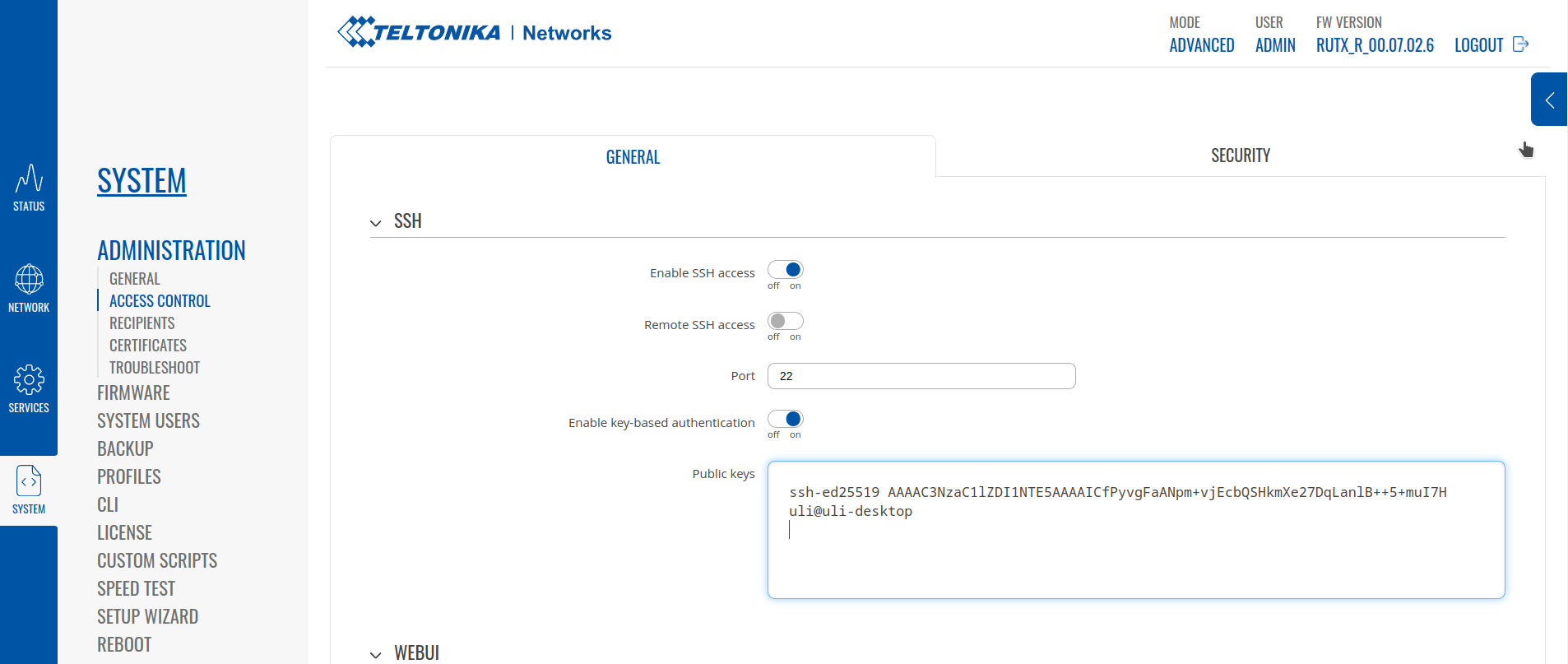
之后记得点击页面底部的 Save & Apply!
现在你可以使用公钥登录,例如:
ssh_id_teltonika.sh
ssh -i id_teltonika [email protected]Check out similar posts by category:
Networking, OpenWRT
If this post helped you, please consider buying me a coffee or donating via PayPal to support research & publishing of new posts on TechOverflow