
如何使用 xlsx / SheetJS 使单元格加粗
首先,你需要了解截至 2023 年 8 月,标准 xlsx / SheetJS 社区版不支持单元格样式。
因此,你需要使用分支 xlsx-js-style,你可以使用以下命令安装
install_xlsx_js_style.sh
npm i --save xlsx-js-style现在,基于我们之前的示例,使用这些导入
bold_cell.ts
import * as XLSX from 'xlsx-js-style';
import { saveAs } from 'file-saver';和此代码生成带有加粗单元格的 XLSX 文件:
bold_cell.ts
// Create an empty workbook
const wb = XLSX.utils.book_new();

// Create an empty worksheet
// If this weren't a minimal example, your data would go here
const ws = XLSX.utils.aoa_to_sheet([
    ["Test"]
]);

// Make cell bold
ws["A1"].s = {
    font: {
        bold: true,
    }
};

// Add the worksheet to the workbook
XLSX.utils.book_append_sheet(wb, ws, 'Sheet1');

// Export the workbook to XLSX format
const wbout = XLSX.write(wb, { bookType: 'xlsx', type: 'buffer' });

// Convert the binary data to a Blob
const blob = new Blob([wbout], { type: 'application/vnd.ms-excel' });

// Download of the file using file-saver
saveAs(blob, 'example.xlsx');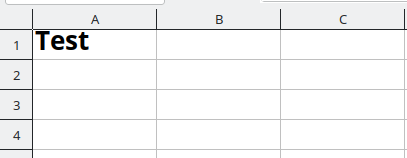
Check out similar posts by category:
JavaScript, Typescript
If this post helped you, please consider buying me a coffee or donating via PayPal to support research & publishing of new posts on TechOverflow