
使用 UliEngineering 绘制微带线阻抗与线宽的关系图
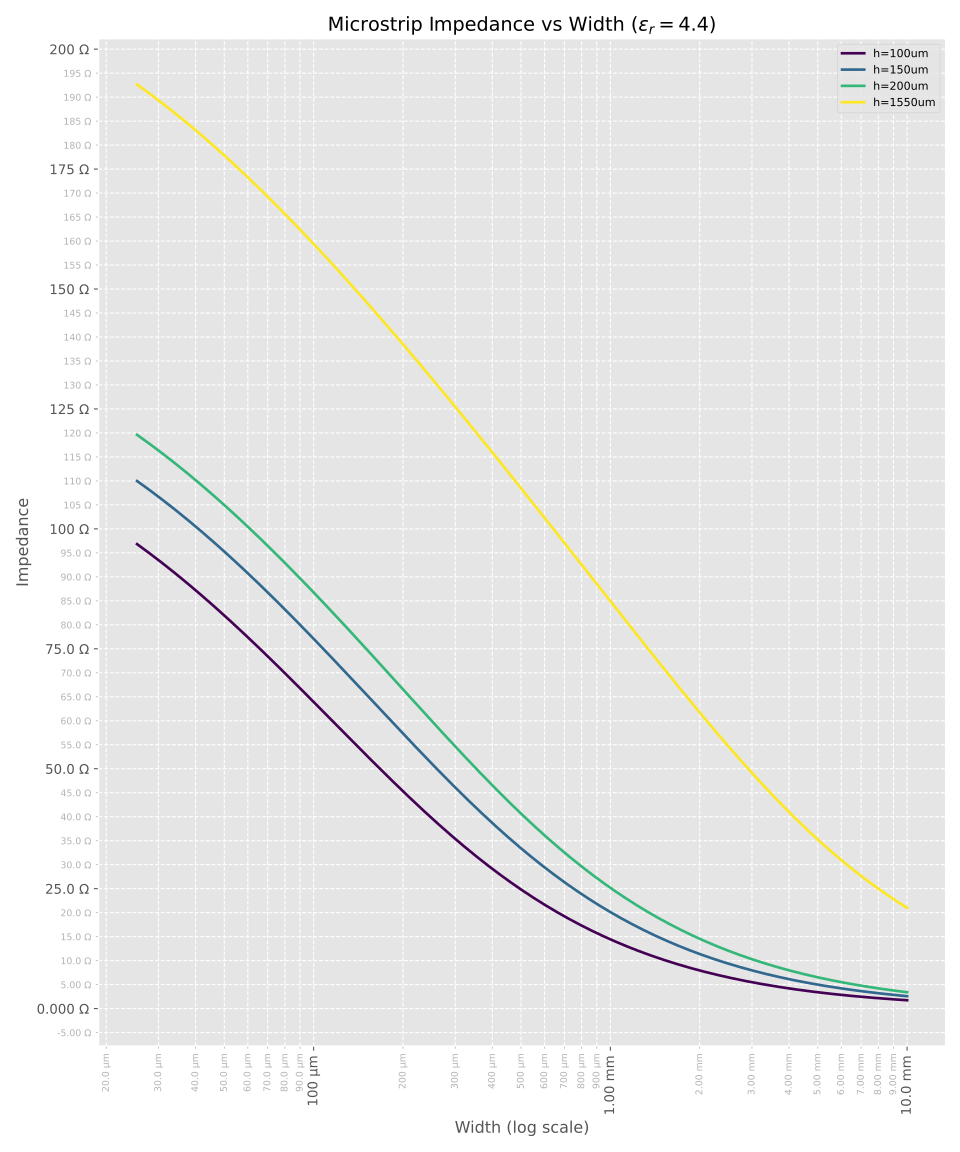
以下图表提供了一种直观方式,用于展示不同基板高度和厚度下微带线宽度与阻抗之间的关系。
关于标准 PCB 叠层厚度和 $\epsilon_r$ 值的更多信息,请参见不同标准叠层的半固化片和芯板厚度。
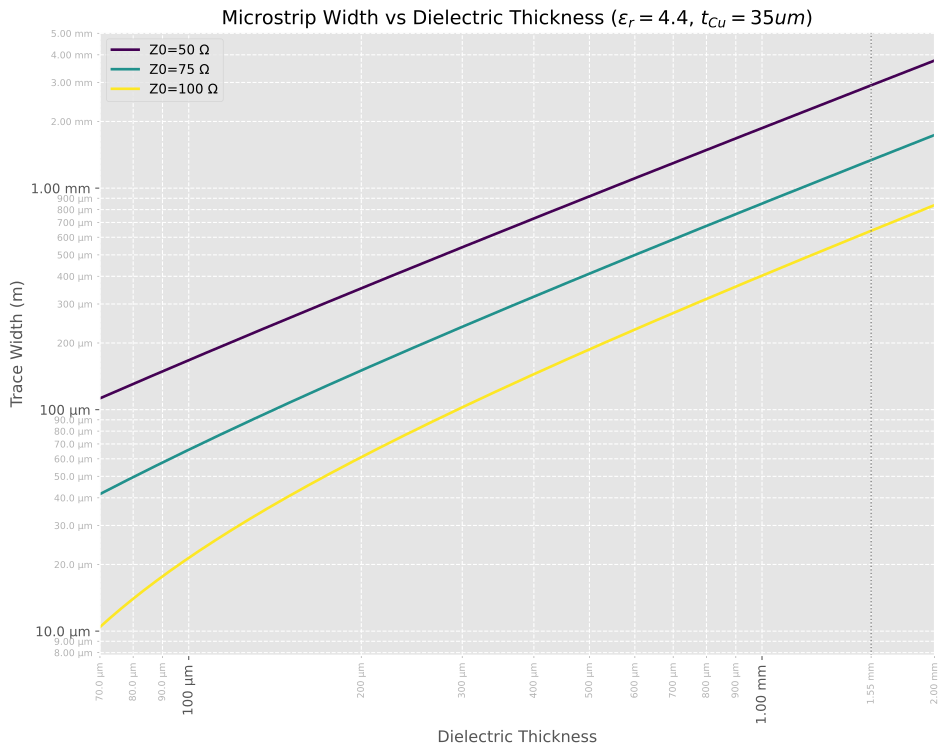
查看相同数据的另一种方式是,针对预设阻抗值绘制介电厚度与走线宽度的关系图:
或以 mil 为单位:

基础示例
以下 Python 脚本展示了如何使用 UliEngineering 库计算单组参数的微带线阻抗。
example_microstrip_width_calculation.py
#!/usr/bin/env python3
from UliEngineering.Electronics.Microstrip import microstrip_width
from UliEngineering.EngineerIO import format_value
from UliEngineering.EngineerIO.Length import convert_length_to_unit

# 使用带单位的字符串参数计算 50 Ω 微带线的宽度
w = microstrip_width("50 Ω", h="150 um", t="35 um", e_r="4.4")
# 将结果(米)转换为 mil 并打印
w_mil = convert_length_to_unit(w, "m", "mil")
print(format_value(w_mil, "mil"))示例脚本输出
output.txt
10.2 mil绘图源代码
以下脚本用于生成上方所示的阻抗与线宽关系图。
plot_microstrip_impedance_vs_width.py
#!/usr/bin/env python3
# SPDX-License-Identifier: CC0-1.0
import numpy as np
import matplotlib.pyplot as plt
from matplotlib.ticker import FuncFormatter, AutoMinorLocator

# UliEngineering 导入
from UliEngineering.Electronics.Microstrip import microstrip_impedance
from UliEngineering.EngineerIO import format_value
from UliEngineering.EngineerIO.Length import normalize_length

# 常量
e_r = 4.4
thicknesses = ["100um", "150um", "200um", "1550um"]
# 铜厚(默认 35um,因为未指定但计算需要)
t_copper = "35um"

# 宽度轴:1mil 到 10mm 线性
w_min = normalize_length("1mil")
w_max = normalize_length("10mm")
# 对于对数 x 轴,需要对数间隔的宽度值;使用 np.logspace
widths = np.logspace(np.log10(w_min), np.log10(w_max), 1000)

# 绘图
plt.style.use("ggplot")
fig, ax = plt.subplots(figsize=(10, 12))

# 生成颜色
colors = plt.cm.viridis(np.linspace(0, 1, len(thicknesses)))

for h_str, c in zip(thicknesses, colors):
    # 计算每个宽度对应的阻抗
    # microstrip_impedance 使用数学函数,因此不直接支持 numpy 数组
    zs = [microstrip_impedance(w, h=h_str, t=t_copper, e_r=e_r) for w in widths]

    ax.plot(widths, zs, color=c, lw=2, label=f"h={h_str}")

# 添加图例
legend = ax.legend(loc='upper right', fontsize='small')

ax.set_xscale("log")
ax.set_xlabel("Width (log scale)")
ax.set_ylabel("Impedance")
ax.set_title(rf"Microstrip Impedance vs Width ($\epsilon_r={e_r}$)")
ax.grid(True, which="both", ls="--")

# 使用 EngineerIO format_value 的轴格式化器
ax.xaxis.set_major_formatter(FuncFormatter(lambda x, pos: format_value(x, "m")))
ax.yaxis.set_major_formatter(FuncFormatter(lambda y, pos: format_value(y, "Ω")))

# 启用次要刻度并在 Y 轴添加次要刻度标签
ax.minorticks_on()
# 对于线性刻度,AutoMinorLocator 通常效果不错,也可以让 matplotlib 自动处理。
# 模板使用了 LogLocator,但我们这里是线性的。
ax.yaxis.set_minor_locator(AutoMinorLocator())
ax.yaxis.set_minor_formatter(FuncFormatter(lambda y, pos: format_value(y, "Ω")))

# 次要刻度标签样式:缩小 30%,颜色为 70% 灰色
maj_ylabels = ax.yaxis.get_ticklabels(which='major')
if len(maj_ylabels) > 0:
    base_size = maj_ylabels[0].get_size()
else:
    base_size = plt.rcParams.get('ytick.labelsize', plt.rcParams.get('font.size', 10))
ax.tick_params(axis='y', which='minor', labelsize=base_size * 0.7, labelcolor='0.7', colors='0.7')

# 同时设置 x 轴次要刻度并用较小的旋转标签样式
from matplotlib.ticker import LogLocator
ax.xaxis.set_minor_locator(LogLocator(base=10.0, subs=(2, 3, 4, 5, 6, 7, 8, 9)))
ax.xaxis.set_minor_formatter(FuncFormatter(lambda x, pos: format_value(x, "m")))

maj_xlabels = ax.xaxis.get_ticklabels(which='major')
if len(maj_xlabels) > 0:
    base_x_size = maj_xlabels[0].get_size()
else:
    base_x_size = plt.rcParams.get('xtick.labelsize', plt.rcParams.get('font.size', 10))
ax.tick_params(axis='x', which='minor', labelsize=base_x_size * 0.7, labelcolor='0.7', colors='0.7')

for tl in ax.get_xminorticklabels():
    tl.set_rotation(90)
for tl in ax.get_xmajorticklabels():
    tl.set_rotation(90)

fig.tight_layout()
plt.show()
plt.savefig("Microstrip-Impedance.svg")另一方面,以下脚本针对预设阻抗值生成介电厚度与线宽的关系图(即上方第二和第三张图,第三张使用 --y-unit mil 生成)。
plot_microstrip_width_vs_thickness.py
#!/usr/bin/env python3
# SPDX-License-Identifier: CC0-1.0
import argparse
import numpy as np
import matplotlib.pyplot as plt
from matplotlib.ticker import FuncFormatter, LogLocator

# UliEngineering 导入
from UliEngineering.Electronics.Microstrip import microstrip_width
from UliEngineering.EngineerIO import format_value
from UliEngineering.EngineerIO.Length import normalize_length, convert_length_to_unit

# 命令行:选择 Y 轴单位(默认为米,或 "mil")
parser = argparse.ArgumentParser(description="绘制微带线宽度与介电厚度的关系图")
parser.add_argument("--y-unit", choices=("m", "mil"), default="m",
                    help="Y 轴单位:'m' 为米(默认)或 'mil' 为密耳")
args = parser.parse_args()
y_unit = args.y_unit

# 常量
e_r = 4.4
impedances = [50, 75, 100]
# 铜厚
t_copper = "35um"

# 厚度轴:70um 到 2.0mm(对数采样,使值在对数 x 轴上分布均匀)
h_min = normalize_length("70um")
h_max = normalize_length("2mm")
thicknesses = np.logspace(np.log10(h_min), np.log10(h_max), num=1000)

# 绘图
plt.style.use("ggplot")
fig, ax = plt.subplots(figsize=(10, 8))

# 使用 viridis 生成颜色,获得更好的感知均匀性
colors = plt.cm.viridis(np.linspace(0, 1, len(impedances)))

# 计算宽度曲线并收集,以便在需要时确定 Y 轴范围
all_ws = []
for z0, c in zip(impedances, colors):
    ws = [microstrip_width(Z0=z0, h=h, t=t_copper, e_r=e_r) for h in thicknesses]
    ax.plot(thicknesses, ws, color=c, lw=2, label=f"Z0={z0} Ω")
    all_ws.append(np.array(ws))

# 添加图例
legend = ax.legend(loc='upper left', fontsize='medium')

ax.set_xlabel("Dielectric Thickness")
ax.set_ylabel(f"Trace Width ({'m' if y_unit == 'm' else 'mil'})")
ax.set_title(rf"Microstrip Width vs Dielectric Thickness ($\epsilon_r={e_r}$, $t_{{Cu}}={t_copper}$)")
ax.grid(True, which="both", ls="--")

# 双轴对数刻度
ax.set_xscale("log")
ax.set_yscale("log")

# 严格将 X 轴范围限制在 70 µm 到 2.0 mm
ax.set_xlim(h_min, h_max)

# 配置对数刻度的主刻度和次刻度定位器
major_x_locator = LogLocator(base=10.0)
minor_x_locator = LogLocator(base=10.0, subs=(2, 3, 4, 5, 6, 7, 8, 9))
major_y_locator = LogLocator(base=10.0)
minor_y_locator = LogLocator(base=10.0, subs=(2, 3, 4, 5, 6, 7, 8, 9))
ax.xaxis.set_major_locator(major_x_locator)
ax.xaxis.set_minor_locator(minor_x_locator)
ax.yaxis.set_major_locator(major_y_locator)
ax.yaxis.set_minor_locator(minor_y_locator)

# 使用 EngineerIO format_value 的轴格式化器
ax.xaxis.set_major_formatter(FuncFormatter(lambda x, pos: format_value(x, "m")))

# Y 轴格式化器取决于请求的单位。
if y_unit == "m":
    ax.yaxis.set_major_formatter(FuncFormatter(lambda y, pos: format_value(y, "m")))
    ax.yaxis.set_minor_formatter(FuncFormatter(lambda y, pos: format_value(y, "m")))
else:
    # 使用辅助函数以 mil 格式化值,不带 SI 前缀
    def format_mil_no_prefix(y, pos):
        mils = convert_length_to_unit(y, "m", "mil")
        if mils >= 100:
            s = f"{int(round(mils))} mil"
        elif mils >= 10:
            s = f"{mils:.1f} mil"
        elif mils >= 1:
            s = f"{mils:.2f} mil"
        else:
            s = f"{mils:.3f} mil"
        return s

    ax.yaxis.set_major_formatter(FuncFormatter(format_mil_no_prefix))
    ax.yaxis.set_minor_formatter(FuncFormatter(format_mil_no_prefix))

# 启用次要刻度
ax.minorticks_on()
ax.xaxis.set_minor_formatter(FuncFormatter(lambda x, pos: format_value(x, "m")))

# 计算并设置受限于请求 X 范围的 X 轴刻度
major_locs = major_x_locator.tick_values(h_min, h_max)
minor_locs = minor_x_locator.tick_values(h_min, h_max)
major_locs = np.array([m for m in major_locs if m >= h_min and m <= h_max])
minor_locs = np.array([m for m in minor_locs if m >= h_min and m <= h_max])

# 在 X = 1.55 mm 处添加特殊次刻度
special_tick = normalize_length("1.55mm")
if special_tick not in minor_locs:
    minor_locs = np.sort(np.concatenate((minor_locs, [special_tick])))

# 显式设置刻度
ax.set_xticks(major_locs, minor=False)
ax.set_xticks(minor_locs, minor=True)

# 同时在 1.55 mm 处绘制细微的垂直参考线以强调该特殊点
ax.axvline(special_tick, color='0.5', linestyle=':', linewidth=1)

# 从数据计算 Y 范围,并在 mil 模式下设置合适的刻度
if len(all_ws) > 0:
    y_all = np.concatenate(all_ws)
    y_all = y_all[y_all > 0]
    if len(y_all) > 0:
        y_min = np.min(y_all)
        y_max = np.max(y_all)
        # 边距
        y_pad = (np.log10(y_max) - np.log10(y_min)) * 0.05 if y_max > y_min else 0.1
        ax.set_ylim(10 ** (np.log10(y_min) - y_pad), 10 ** (np.log10(y_max) + y_pad))

        if y_unit == 'mil':
            yl, yu = ax.get_ylim()
            yl_mil = convert_length_to_unit(yl, 'm', 'mil')
            yu_mil = convert_length_to_unit(yu, 'm', 'mil')
            # 选择 mil 的主刻度十进制位(10, 100, 1000, ...)
            dmin = int(np.floor(np.log10(max(yl_mil, 1e-12))))
            dmax = int(np.ceil(np.log10(max(yu_mil, 1e-12))))
            # 尽可能确保包含 1 mil (10^0) 作为主刻度
            dstart = max(0, dmin)
            majors_mil = [10 ** d for d in range(dstart, dmax + 1)]
            majors_m = [convert_length_to_unit(m, 'mil', 'm') for m in majors_mil]
            minors_m = []
            for d in range(dstart, dmax + 1):
                for s in (2, 3, 4, 5, 6, 7, 8, 9):
                    v_mil = s * (10 ** d)
                    minors_m.append(convert_length_to_unit(v_mil, 'mil', 'm'))
            majors_m = np.array([m for m in majors_m if m >= yl and m <= yu])
            minors_m = np.array([m for m in minors_m if m >= yl and m <= yu])
            ax.set_yticks(majors_m, minor=False)
            ax.set_yticks(minors_m, minor=True)

# 如需要则旋转标签
for tl in ax.get_xminorticklabels():
    tl.set_rotation(90)
for tl in ax.get_xmajorticklabels():
    tl.set_rotation(90)

# 次刻度标签样式:缩小 30%,颜色为 70% 灰色(双轴)
maj_ylabels = ax.yaxis.get_ticklabels(which='major')
if len(maj_ylabels) > 0:
    base_y_size = maj_ylabels[0].get_size()
else:
    base_y_size = plt.rcParams.get('ytick.labelsize', plt.rcParams.get('font.size', 10))
maj_xlabels = ax.xaxis.get_ticklabels(which='major')
if len(maj_xlabels) > 0:
    base_x_size = maj_xlabels[0].get_size()
else:
    base_x_size = plt.rcParams.get('xtick.labelsize', plt.rcParams.get('font.size', 10))
ax.tick_params(axis='y', which='minor', labelsize=base_y_size * 0.7, labelcolor='0.7', colors='0.7')
ax.tick_params(axis='x', which='minor', labelsize=base_x_size * 0.7, labelcolor='0.7', colors='0.7')

fig.tight_layout()
plt.savefig("Microstrip-Width.svg", dpi=300, bbox_inches='tight')
# 仅在非无头 CI 环境中交互式显示
try:
    plt.show()
except Exception:
passCheck out similar posts by category:
Electronics, RF
If this post helped you, please consider buying me a coffee or donating via PayPal to support research & publishing of new posts on TechOverflow