
如何使用 UliEngineering 在 Python 中生成周期性斜坡信号
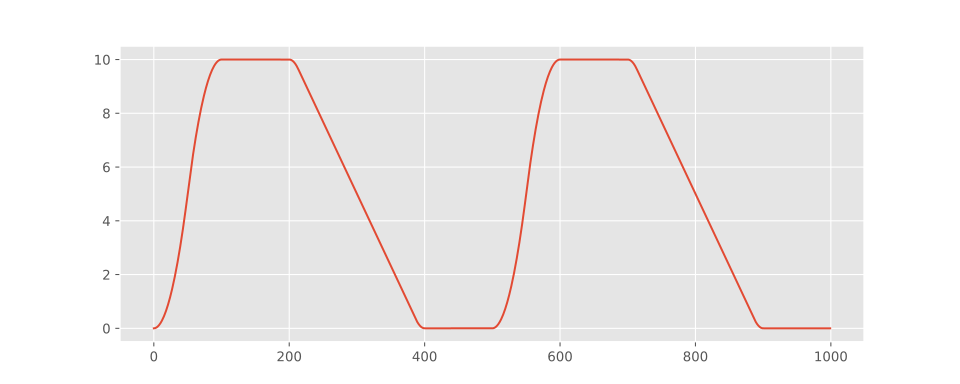
UliEngineering 包含一个 UliEngineering.SignalProcessing.Ramp 模块,可用于生成斜坡信号,支持自定义加速和减速曲线,并可选择生成 C² 连续的波形。
最小用法示例:
generate_ramp.py
from UliEngineering.SignalProcessing.Ramp import periodic_ramp

# 生成信号
y = periodic_ramp(
    frequency = 2.0,
    samplerate=1000,
    amplitude=10,
    rise_time=0.1,
    fall_time=0.2,
    high_time=0.1,
    acceleration=4000,
    length=1.0,
)
详细绘图脚本示例
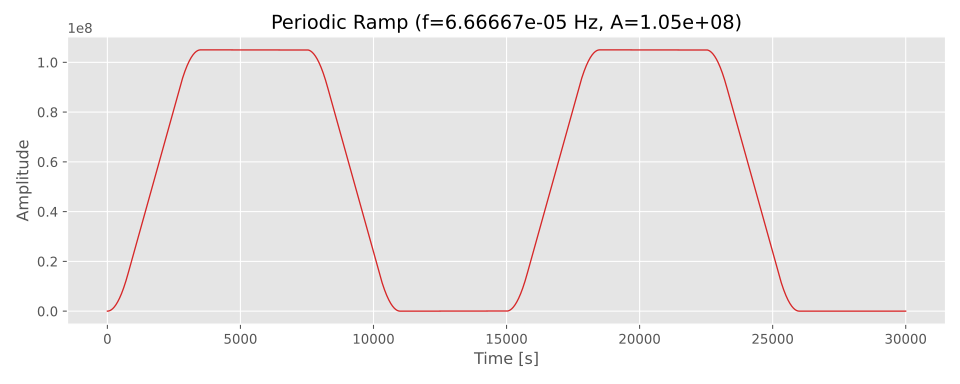
由以下 Python 代码生成
plot_ramp.py
#!/usr/bin/env python3
"""
使用 `UliEngineering.SignalProcessing.Ramp.periodic_ramp` 生成并绘制
周期性斜坡信号的示例脚本。

用法:
    python3 examples/ramp_example.py

可通过选项调整采样率、频率、幅值、上升/下降时间、
加速度(拐点)、周期数以及输出文件名。
"""

import argparse
import numpy as np
import matplotlib.pyplot as plt
from UliEngineering.SignalProcessing.Ramp import periodic_ramp
plt.style.use("ggplot")

def main():
    p = argparse.ArgumentParser(description="生成并绘制周期性斜坡信号")
    p.add_argument('--samplerate', '-r', type=float, default=1.0, help='每秒采样数')
    p.add_argument('--frequency', '-f', type=float, default=1.0/15000.0, help='信号频率(Hz)')
    p.add_argument('--amplitude', '-a', type=float, default=1.05e8, help='峰峰值幅值')
    p.add_argument('--rise', type=float, default=3500.0, help='上升时间(秒)')
    p.add_argument('--fall', type=float, default=3500.0, help='下降时间(秒)')
    p.add_argument('--high', type=float, default=4000.0, help='高电平保持时间(秒)')
    p.add_argument('--acceleration', '-A', type=float, default=50.0, help='边沿加速度(单位/秒²)')
    p.add_argument('--periods', type=int, default=2, help='要生成的周期数')
    p.add_argument('--outfile', '-o', default='ramp.svg', help='保存绘图的文件名')
    args = p.parse_args()

    # 计算生成所需周期数所需的总长度
    period = 1.0 / args.frequency
    length = args.periods * period

    # 生成信号
    y = periodic_ramp(
        args.frequency,
        args.samplerate,
        amplitude=args.amplitude,
        rise_time=args.rise,
        fall_time=args.fall,
        high_time=args.high,
        acceleration=args.acceleration,
        length=length,
    )

    # 时间轴
    t = np.arange(y.size) / args.samplerate

    # 绘图
    plt.figure(figsize=(10, 4))
    plt.plot(t, y, color='tab:red', linewidth=1.0)
    plt.xlabel('时间 [s]')
    plt.ylabel('幅值')
    plt.title(f'周期性斜坡 (f={args.frequency:.6g} Hz, A={args.amplitude:g})')
    plt.grid(True)
    plt.tight_layout()
    plt.savefig(args.outfile, dpi=150)
    print(f"已将绘图保存到 {args.outfile}")

    # 交互式显示(如果可用)
    try:
        plt.show()
    except Exception:
        pass


if __name__ == '__main__':
main()Check out similar posts by category:
Python, UliEngineering, Data Science
If this post helped you, please consider buying me a coffee or donating via PayPal to support research & publishing of new posts on TechOverflow