
商业策略:根据销售能力和资金需求确定目标订单规模
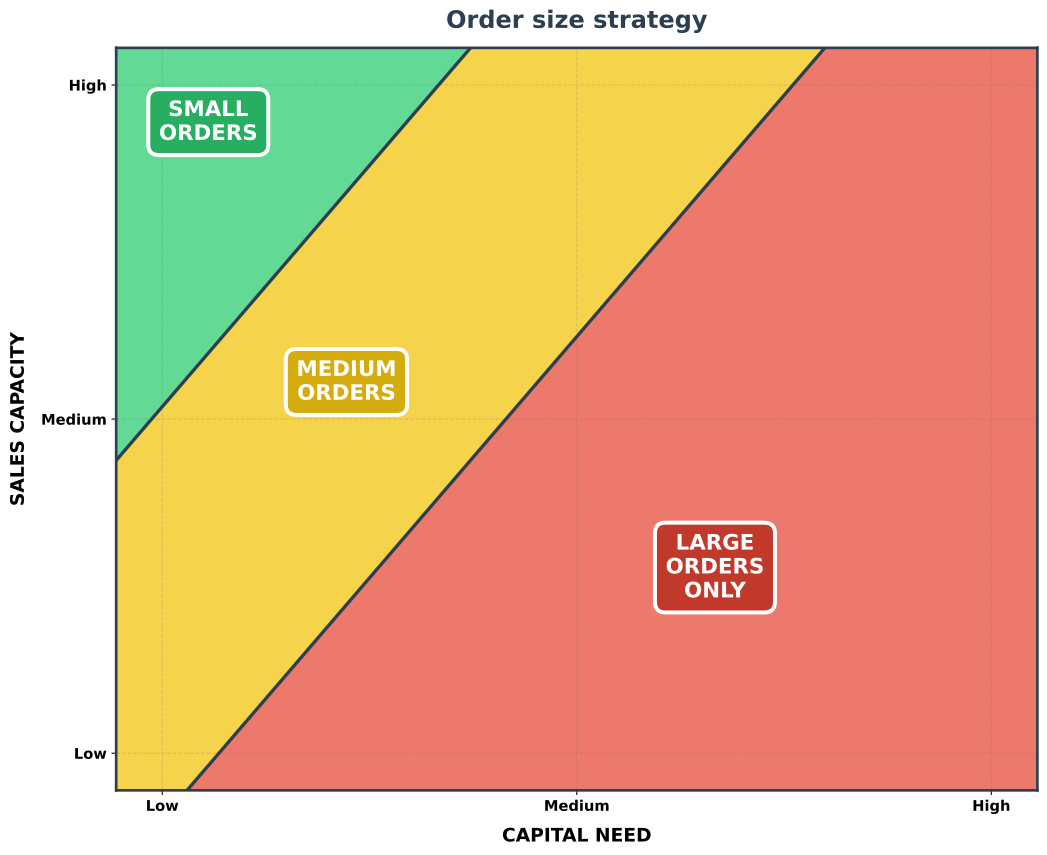
- 将*资金需求(X 轴)与销售能力(Y 轴)*对应,推荐小型 / 中型 / 大型订单策略。
- 高销售能力 + 低资金需求 → 优先选择小型、高频订单。
- 销售能力允许达成多笔交易,而小型交易通常更容易、更快速地成交。
- 较低的资金需求意味着即使是一批小订单也能覆盖成本。
- 小型交易通常能在更短时间内找到替代客户,以应对客户退出。
- 时机合适时,仍可接受中/大型订单,并可有策略地选择中/大型订单(例如选择更容易成交的)以提升营收。
- 低销售能力 + 高资金需求 → 专注于更少、更大的客户交易。
- 销售能力只允许达成少量交易。
- 高资金需求要求每笔交易都足够大,才能覆盖成本。
- 橙色中间区域表明中型和大型订单都可行。
- 您可以根据市场状况、竞争格局和自身优势进行选择。
- 大型订单通常单笔风险更高(销售周期更长、谈判更多、失败概率更高)。
- 但大型订单一旦成功成交,能更从容地覆盖资金需求。
- 通常,大型订单竞争更激烈,因为您要与更大的玩家竞争(由于他们极高的资金需求,中/小型订单对他们往往不划算——如本图所示),而大型玩家在销售能力上很容易胜过您,且往往具有更高的项目可信度。
- 对初创企业:根据此图选择策略,并考虑您的可用资金和销售带宽。
- 小/中/大型订单各需多少销售能力,取决于您的市场和商业模式。
- 同样,每笔订单满足的资金需求因行业和成本结构而异。
- 应避免在不同商业模式和行业之间比较绝对订单规模。
small orders(小型订单)或large orders(大型订单)的含义取决于您的商业模式和成本结构。- 基准:小型交易
< $10k,中型交易$10k - $100k,大型交易> $100k。 - 在某些行业,大型交易难以成交,以至于每赚取
$所需的销售能力高于中/小型交易。此时应相应调整策略。
- 基准:小型交易
- 特殊情况: 电商 / B2C 可通过自动化以略低的销售能力达成更多小型交易,但客服和履约成本会增加每笔订单所需的人员能力,因此总体逻辑仍然适用。
订单规模策略图生成脚本
plot_order_size_strategy.py
#!/usr/bin/env python3
import matplotlib.pyplot as plt
import numpy as np

def create_order_size_strategy():
    """
    创建更清晰的订单规模策略图,标签放置更合理。
    """

    fig, ax = plt.subplots(figsize=(11, 9))

    # 创建网格
    x = np.linspace(0, 10, 500)
    y = np.linspace(0, 10, 500)
    X, Y = np.meshgrid(x, y)

    Z = np.zeros_like(X)

    for i in range(len(x)):
        for j in range(len(y)):
            capital_need = X[j, i]
            sales_capacity = Y[j, i]

            # 调整评分以获得更清晰的区域边界
            score = (capital_need / 10) * 1.3 - (sales_capacity / 10) * 0.9 + 0.35

            if score > 0.45:
                Z[j, i] = 2  # 大型订单
            elif score < -0.05:
                Z[j, i] = 0  # 小型订单
            else:
                Z[j, i] = 1  # 中型订单

    colors_list = ['#2ECC71', '#F1C40F', '#E74C3C']

    # 创建清晰的直线边界(解析法),避免锯齿状等高线
    x_line = np.linspace(0, 10, 500)

    # 基于 score = 0.13*x - 0.09*y + 0.35
    def y_from_score(x, score):
        return (0.13 * x + 0.35 - score) / 0.09

    # 与之前阈值对应的边界
    y_boundary_low = y_from_score(x_line, 0.45)   # 大型与中型之间
    y_boundary_high = y_from_score(x_line, -0.05) # 中型与小型之间

    # 裁剪到绘图范围
    y_low_clip = np.clip(y_boundary_low, 0, 10)
    y_high_clip = np.clip(y_boundary_high, 0, 10)

    # 填充区域:大型(红色)位于 y_low 下方,中型(黄色)位于中间,小型(绿色)位于 y_high 上方
    ax.fill_between(x_line, 0, y_low_clip, where=(y_low_clip > 0), color=colors_list[2], alpha=0.75, zorder=0)
    ax.fill_between(x_line, y_low_clip, y_high_clip, where=(y_high_clip > y_low_clip), color=colors_list[1], alpha=0.75, zorder=0)
    ax.fill_between(x_line, y_high_clip, 10, where=(y_high_clip < 10), color=colors_list[0], alpha=0.75, zorder=0)

    # 绘制直线边界
    ax.plot(x_line, y_boundary_low, color='#2C3E50', linewidth=2.5)
    ax.plot(x_line, y_boundary_high, color='#2C3E50', linewidth=2.5)

    # ==========================================
    # 区域标签 - 正确居中
    # ==========================================

    # 小型订单 - 左上
    ax.text(1.0, 9, 'SMALL\nORDERS', fontsize=16, fontweight='bold',
            ha='center', va='center', color='white',
            bbox=dict(boxstyle='round,pad=0.5', facecolor='#27AE60',
                     edgecolor='white', linewidth=3))

    # 中型订单 - 对角线中心
    ax.text(2.5, 5.5, 'MEDIUM\nORDERS', fontsize=16, fontweight='bold',
            ha='center', va='center', color='white',
            bbox=dict(boxstyle='round,pad=0.5', facecolor='#D4AC0D',
                     edgecolor='white', linewidth=3))

    # 大型订单 - 右下
    ax.text(6.5, 3, 'LARGE\nORDERS\nONLY', fontsize=16, fontweight='bold',
            ha='center', va='center', color='white',
            bbox=dict(boxstyle='round,pad=0.5', facecolor='#C0392B',
                     edgecolor='white', linewidth=3))

    # ==========================================
    # 坐标轴设置
    # ==========================================
    ax.set_xlim(0, 10)
    ax.set_ylim(0, 10)
    ax.set_xlabel('CAPITAL NEED', fontsize=14, fontweight='bold', labelpad=10)
    ax.set_ylabel('SALES CAPACITY', fontsize=14, fontweight='bold', labelpad=10)

    # 刻度标签
    ax.set_xticks([0.5, 5, 9.5])
    ax.set_xticklabels(['Low', 'Medium', 'High'], fontsize=11, fontweight='bold')
    ax.set_yticks([0.5, 5, 9.5])
    ax.set_yticklabels(['Low', 'Medium', 'High'], fontsize=11, fontweight='bold')

    # 标题
    ax.set_title('Order size strategy',
                 fontsize=18, fontweight='bold', color='#2C3E50', pad=15)

    # 移除方向箭头以减少视觉杂乱

    # 样式
    for spine in ax.spines.values():
        spine.set_linewidth(2)
        spine.set_color('#2C3E50')

    # 淡色网格
    ax.grid(True, alpha=0.2, linestyle='--', color='#666666')

    plt.tight_layout()
    plt.subplots_adjust(bottom=0.08)

    return fig, ax


if __name__ == "__main__":
    print("Creating clean Order size strategy...")

    fig, ax = create_order_size_strategy()
    fig.savefig('order_size_strategy.svg', bbox_inches='tight',
                facecolor='white', edgecolor='none')
    print("✓ Saved: order_size_strategy.png")

plt.show()Check out similar posts by category:
Business
If this post helped you, please consider buying me a coffee or donating via PayPal to support research & publishing of new posts on TechOverflow