
如何使用 UliEngineering 在 Python 中计算 Bingham 塑性应力
你可以使用 UliEngineering Python 库轻松计算 Bingham 塑性流体的剪切应力。Bingham 塑性模型描述的是这样一类流体:在低剪切应力下表现为固体,超过屈服应力后则像液体一样流动:
bingham_stress.py
from UliEngineering.Physics.Viscosity import bingham_stress, BinghamConstants
from UliEngineering.EngineerIO import *

# 使用默认常数计算 Bingham 应力
gamma = 10.0  # 剪切率,单位 s^-1
tau = bingham_stress(gamma)
print(f"剪切率 {gamma} s^-1 下的剪切应力:{format_value(tau, 'Pa')}")

# 计算钻井泥浆的 Bingham 应力
drilling_mud = BinghamConstants(name='Drilling mud', tau0=20.0, mu_p=0.3)
gamma = 25.0
tau = bingham_stress(gamma, drilling_mud)
print(f"钻井泥浆在剪切率 {gamma} s^-1 下的剪切应力:{format_value(tau, 'Pa')}")

# 计算牙膏的 Bingham 应力
toothpaste = BinghamConstants(name='Toothpaste', tau0=50.0, mu_p=0.5)
gamma = 5.0
tau = bingham_stress(gamma, toothpaste)
print(f"牙膏在剪切率 {gamma} s^-1 下的剪切应力:{format_value(tau, 'Pa')}")示例输出
bingham_stress_output.txt
Shear stress at 10.0 s^-1: 11.0 Pa
Drilling mud shear stress at 25.0 s^-1: 27.5 Pa
Toothpaste shear stress at 5.0 s^-1: 52.5 Pa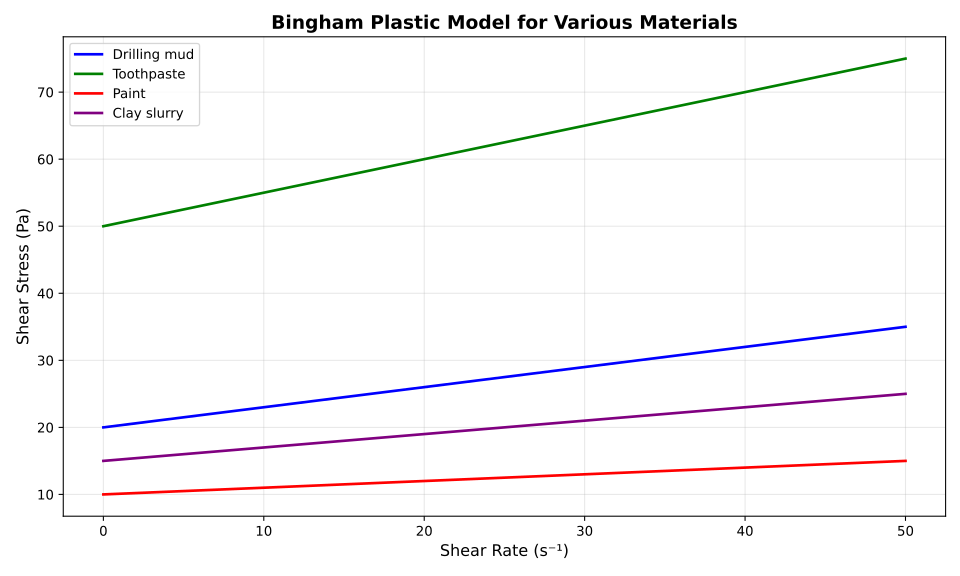
Bingham 塑性模型由下式给出:
$$ \tau = \tau_0 + \mu_p \cdot \dot{\gamma} $$其中 $\tau$ 是剪切应力,$\tau_0$ 是屈服应力(使流体开始流动所需的最小应力),$\mu_p$ 是塑性粘度,$\dot{\gamma}$ 是剪切率。
Bingham 塑性体是非牛顿流体的一种。它存在一个屈服应力,低于该值时表现为固体。超过屈服应力后,流体以恒定的塑性粘度流动。常见的例子包括钻井泥浆、牙膏、油漆,以及番茄酱等某些食品。
上图展示了多种材料在不同剪切率下的 Bingham 塑性模型。可以看到,所有材料都有一个非零的截距(屈服应力),随后随剪切率线性增长,斜率由塑性粘度决定。
UliEngineering 库提供了 BinghamConstants 数据类,用于定义材料特定的屈服应力和塑性粘度参数。若不提供常数,则使用默认示例值(τ₀ = 10 Pa,μₚ = 0.1 Pa·s)。
相关文章
- 如何使用 UliEngineering 在 Python 中计算 Poiseuille 流量
- 如何使用 UliEngineering 在 Python 中计算 Stokes 阻力
- 如何使用 UliEngineering 在 Python 中计算雷诺数
绘图生成脚本
plot_bingham.py
#!/usr/bin/env python3
import matplotlib.pyplot as plt
import numpy as np
import sys
sys.path.insert(0, '/home/uli/dev/UliEngineering')

from UliEngineering.Physics.Viscosity import (
    bingham_stress,
    BinghamConstants,
)

# 用于绘图的剪切率范围
gamma = np.linspace(0, 50, 100)  # 0 到 50 s^-1

# 创建图表
plt.figure(figsize=(10, 6))

# 绘制不同 Bingham 材料的曲线
materials = [
    ('Drilling mud', BinghamConstants(name='Drilling mud', tau0=20.0, mu_p=0.3), 'blue'),
    ('Toothpaste', BinghamConstants(name='Toothpaste', tau0=50.0, mu_p=0.5), 'green'),
    ('Paint', BinghamConstants(name='Paint', tau0=10.0, mu_p=0.1), 'red'),
    ('Clay slurry', BinghamConstants(name='Clay slurry', tau0=15.0, mu_p=0.2), 'purple'),
]

for name, constants, color in materials:
    tau = bingham_stress(gamma, constants)
    plt.plot(gamma, tau, label=name, color=color, linewidth=2)

plt.xlabel('Shear Rate (s⁻¹)', fontsize=12)
plt.ylabel('Shear Stress (Pa)', fontsize=12)
plt.title('Bingham Plastic Model for Various Materials', fontsize=14, fontweight='bold')
plt.legend(loc='upper left', fontsize=10)
plt.grid(True, alpha=0.3)

plt.tight_layout()
plt.savefig('bingham_plot.svg', format='svg', dpi=300)
print("图表已保存到 bingham_plot.svg")If this post helped you, please consider buying me a coffee or donating via PayPal to support research & publishing of new posts on TechOverflow